
Supervisor 工作流介绍
基于 LangGraph 官方教程整理
多智能体架构概览
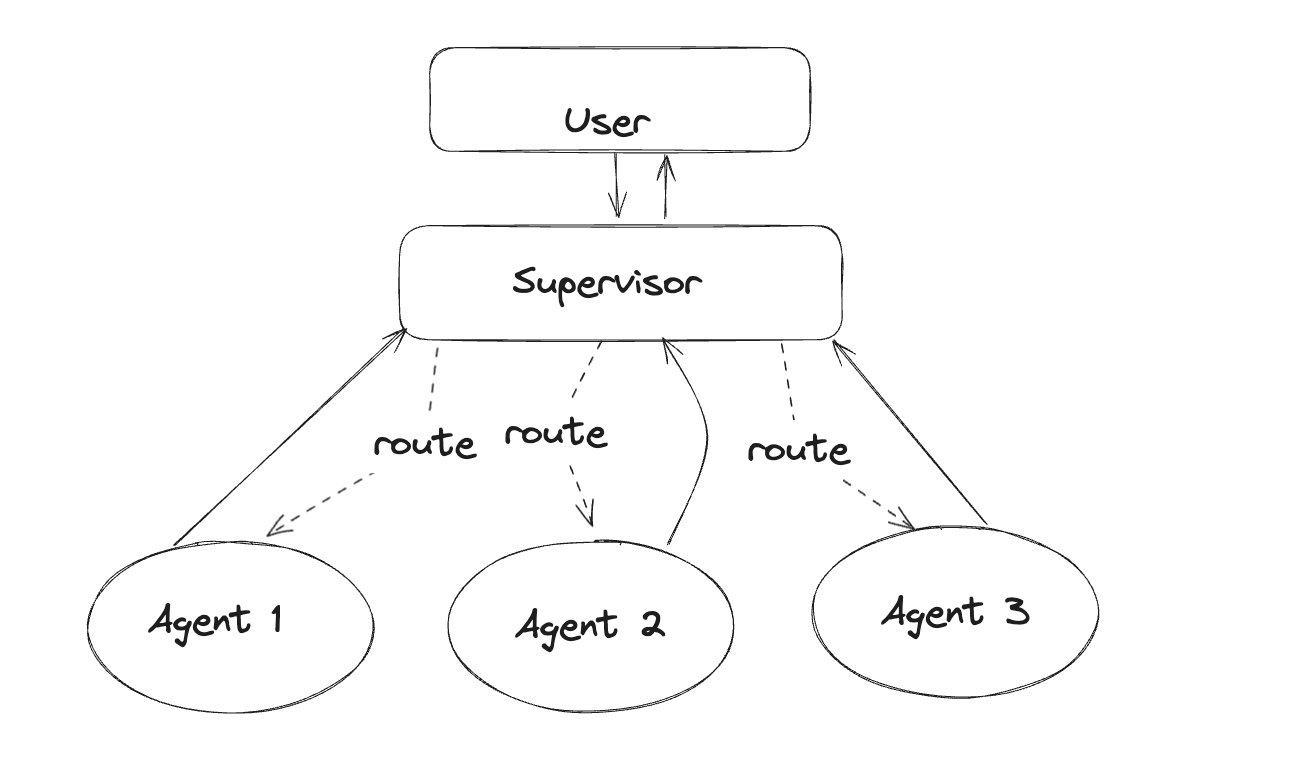
在多智能体系统中,有多种架构模式可以选择。本节重点介绍 Supervisor(监督者)架构,这是最常用且最实用的多智能体协作模式之一。
架构示意图
其他架构模式简介
除了 Supervisor 架构外,还有以下几种常见模式:
| 架构模式 | 简要说明 |
|---|---|
| Parallel(并行) | 多个 Agent 同时处理任务的不同部分 |
| Sequential(顺序) | Agent 按序执行,前一个的输出作为下一个的输入 |
| Loop(循环) | Agent 迭代改进输出,如代码编写+测试循环 |
| Router(路由) | 中央路由器根据任务类型分发给不同 Agent |
| Aggregator(聚合) | 多个 Agent 的输出被汇总合成最终结果 |
| Network(网络) | Agent 之间多对多直接通信,去中心化 |
| Handoffs(交接) | Agent 之间直接传递控制权 |
什么是 Supervisor 架构?
Supervisor 架构是一种集中式的多智能体协作模式。在这种架构中,有一个"监督者" Agent(通常由 LLM 驱动)负责:
- 理解用户请求
- 决定调用哪个子 Agent
- 协调多个 Agent 的工作顺序
- 汇总结果返回给用户
用户请求 → Supervisor(总调度)→ 选择合适的 Worker Agent → 执行任务 → 返回结果给 Supervisor → 汇总回复用户架构示意
                         ┌─────────────────┐
                         │   Supervisor    │
                         │   (LLM 决策)    │
                         └────────┬────────┘
                                  │
              ┌───────────────────┼───────────────────┐
              │                   │                   │
              ▼                   ▼                   ▼
        ┌──────────┐        ┌──────────┐        ┌──────────┐
        │ Agent 1  │        │ Agent 2  │        │ Agent 3  │
        │ (专业A)  │        │ (专业B)  │        │ (专业C)  │
└──────────┘ └──────────┘ └──────────┘Supervisor 架构的核心优势
| 优势 | 说明 |
|---|---|
| 流程清晰可控 | 所有通信经过中心节点,便于追踪 |
| 易于调试和监控 | 可以在 Supervisor 层面观察所有交互 |
| 灵活的任务分配 | LLM 可以动态决定调用哪个 Agent |
| 支持并行执行 | 可以同时调用多个 Agent 处理不同子任务 |
| 支持 Map-Reduce | 适合将大任务拆分、并行处理、再汇总 |
适用场景
- 任务有明确的阶段划分
- 需要协调多个专业领域(如研究、数学、编程)
- 需要严格的执行顺序控制
- 复杂任务需要分解后分发给不同专家
实战:构建 Supervisor 多智能体系统
接下来,我们将通过一个完整的实例来演示如何构建 Supervisor 系统。这个系统包含两个专业 Agent:
- 研究 Agent:负责网络搜索和信息检索
- 数学 Agent:负责数学计算
环境准备
首先安装必要的依赖包:
pip install -U langgraph langgraph-supervisor langchain-tavily "langchain[openai]"设置 API 密钥:
import getpass
import os

def _set_if_undefined(var: str):
    if not os.environ.get(var):
        os.environ[var] = getpass.getpass(f"请输入 {var}: ")

_set_if_undefined("OPENAI_API_KEY")
_set_if_undefined("TAVILY_API_KEY")Step 1:创建专业 Worker Agents
研究 Agent
研究 Agent 使用 Tavily 搜索工具进行网络检索:
from langchain_tavily import TavilySearch
from langgraph.prebuilt import create_react_agent

# 创建搜索工具
web_search = TavilySearch(max_results=3)

# 测试搜索工具
web_search_results = web_search.invoke("who is the mayor of NYC?")
print(web_search_results["results"][0]["content"])创建研究 Agent:
research_agent = create_react_agent(
    model="openai:gpt-4.1",
    tools=[web_search],
    prompt=(
        "You are a research agent.\n\n"
        "INSTRUCTIONS:\n"
        "- Assist ONLY with research-related tasks, DO NOT do any math\n"
        "- After you're done with your tasks, respond to the supervisor directly\n"
        "- Respond ONLY with the results of your work, do NOT include ANY other text."
    ),
    name="research_agent",
)数学 Agent
数学 Agent 使用简单的 Python 函数作为工具:
def add(a: float, b: float):
    """Add two numbers."""
    return a + b

def multiply(a: float, b: float):
    """Multiply two numbers."""
    return a * b

def divide(a: float, b: float):
    """Divide two numbers."""
    return a / b

math_agent = create_react_agent(
    model="openai:gpt-4.1",
    tools=[add, multiply, divide],
    prompt=(
        "You are a math agent.\n\n"
        "INSTRUCTIONS:\n"
        "- Assist ONLY with math-related tasks\n"
        "- After you're done with your tasks, respond to the supervisor directly\n"
        "- Respond ONLY with the results of your work, do NOT include ANY other text."
    ),
    name="math_agent",
)测试数学 Agent:
for chunk in math_agent.stream(
    {"messages": [{"role": "user", "content": "what's (3 + 5) x 7"}]}
):
print(chunk)输出示例:
Tool Calls: add(a=3, b=5) → 8.0
Tool Calls: multiply(a=8, b=7) → 56.0
Final Answer: 56Step 2:使用 langgraph-supervisor 创建 Supervisor
最简单的方式是使用预构建的 langgraph-supervisor 库:
from langgraph_supervisor import create_supervisor
from langchain.chat_models import init_chat_model

supervisor = create_supervisor(
    model=init_chat_model("openai:gpt-4.1"),
    agents=[research_agent, math_agent],
    prompt=(
        "You are a supervisor managing two agents:\n"
        "- a research agent. Assign research-related tasks to this agent\n"
        "- a math agent. Assign math-related tasks to this agent\n"
        "Assign work to one agent at a time, do not call agents in parallel.\n"
        "Do not do any work yourself."
    ),
    add_handoff_back_messages=True,
    output_mode="full_history",
).compile()可视化 Supervisor 图结构:
from IPython.display import display, Image
display(Image(supervisor.get_graph().draw_mermaid_png()))运行测试
使用一个需要两个 Agent 协作的查询:
for chunk in supervisor.stream(
    {
        "messages": [
            {
                "role": "user",
                "content": "find US and New York state GDP in 2024. what % of US GDP was New York state?",
            }
        ]
    },
):
print(chunk)执行流程:
- Supervisor 接收请求
- 转交给 research_agent 查找 GDP 数据
- research_agent 完成后返回 Supervisor
- Supervisor 转交给 math_agent 计算百分比
- math_agent 完成后返回 Supervisor
- Supervisor 汇总结果返回用户
输出示例:
In 2024, the US GDP was $29.18 trillion and New York State's GDP was $2.297 trillion.
New York State accounted for approximately 7.87% of the total US GDP in 2024.Step 3:从零构建 Supervisor(深入理解)
如果需要更多控制,可以从零构建 Supervisor 系统。
3.1 设置 Agent 间通信(Handoff)
Handoff 是多智能体架构中的关键概念——一个 Agent 交接控制权给另一个 Agent:
from typing import Annotated
from langchain_core.tools import tool, InjectedToolCallId
from langgraph.prebuilt import InjectedState
from langgraph.graph import StateGraph, START, MessagesState
from langgraph.types import Command

def create_handoff_tool(*, agent_name: str, description: str | None = None):
    """创建交接工具,用于将控制权转移给指定 Agent"""
    name = f"transfer_to_{agent_name}"
    description = description or f"Ask {agent_name} for help."

    @tool(name, description=description)
    def handoff_tool(
        state: Annotated[MessagesState, InjectedState],
        tool_call_id: Annotated[str, InjectedToolCallId],
    ) -> Command:
        tool_message = {
            "role": "tool",
            "content": f"Successfully transferred to {agent_name}",
            "name": name,
            "tool_call_id": tool_call_id,
        }
        return Command(
            goto=agent_name,                    # 目标 Agent 名称
            update={**state, "messages": state["messages"] + [tool_message]},
            graph=Command.PARENT,               # 在父图中导航
        )

    return handoff_tool

# 创建交接工具
assign_to_research_agent = create_handoff_tool(
    agent_name="research_agent",
    description="Assign task to a researcher agent.",
)

assign_to_math_agent = create_handoff_tool(
    agent_name="math_agent",
    description="Assign task to a math agent.",
)3.2 创建 Supervisor Agent
supervisor_agent = create_react_agent(
    model="openai:gpt-4.1",
    tools=[assign_to_research_agent, assign_to_math_agent],
    prompt=(
        "You are a supervisor managing two agents:\n"
        "- a research agent. Assign research-related tasks to this agent\n"
        "- a math agent. Assign math-related tasks to this agent\n"
        "Assign work to one agent at a time, do not call agents in parallel.\n"
        "Do not do any work yourself."
    ),
    name="supervisor",
)3.3 构建多智能体图
from langgraph.graph import END

# 定义多智能体 Supervisor 图
supervisor = (
    StateGraph(MessagesState)
    # 添加节点
    .add_node(supervisor_agent, destinations=("research_agent", "math_agent", END))
    .add_node(research_agent)
    .add_node(math_agent)
    # 添加边
    .add_edge(START, "supervisor")
    # Worker Agent 执行完毕后返回 Supervisor
    .add_edge("research_agent", "supervisor")
    .add_edge("math_agent", "supervisor")
    .compile()
)关键点:
- Worker Agents 执行完毕后总是返回 Supervisor
- 如果想让 Agent 直接回复用户(变成路由器模式),可以移除这些边
Step 4:高级任务委派(Task Delegation)
前面的例子中,Agent 通过解读完整消息历史来确定任务。另一种方式是让 Supervisor 明确制定任务描述:
from langgraph.types import Send

def create_task_description_handoff_tool(
    *, agent_name: str, description: str | None = None
):
    """创建带任务描述的交接工具"""
    name = f"transfer_to_{agent_name}"
    description = description or f"Ask {agent_name} for help."

    @tool(name, description=description)
    def handoff_tool(
        # 由 Supervisor LLM 填充的任务描述
        task_description: Annotated[
            str,
            "Description of what the next agent should do, including all of the relevant context.",
        ],
        state: Annotated[MessagesState, InjectedState],
    ) -> Command:
        task_description_message = {"role": "user", "content": task_description}
        agent_input = {**state, "messages": [task_description_message]}
        return Command(
            # 使用 Send 将特定输入发送给目标 Agent
            goto=[Send(agent_name, agent_input)],
            graph=Command.PARENT,
        )

    return handoff_tool

# 创建带任务描述的交接工具
assign_to_research_agent_with_description = create_task_description_handoff_tool(
    agent_name="research_agent",
    description="Assign task to a researcher agent.",
)

assign_to_math_agent_with_description = create_task_description_handoff_tool(
    agent_name="math_agent",
    description="Assign task to a math agent.",
)使用 Send 的优势:
- Worker Agent 只看到 Supervisor 制定的任务描述,而非完整历史
- 减少上下文膨胀
- 更精确的任务传达
运行示例:
for chunk in supervisor_with_description.stream(
    {
        "messages": [
            {
                "role": "user",
                "content": "find US and New York state GDP in 2024. what % of US GDP was New York state?",
            }
        ]
    },
    subgraphs=True,
):
print(chunk)Supervisor 生成的任务描述:
transfer_to_research_agent(
    task_description="Find the 2024 GDP for both the United States and New York state,
    using the most up-to-date and reputable sources available.
    Provide both GDP values and cite the data sources."
)Supervisor 架构的两种变体
变体一:基本 Supervisor 模式
Agent 定义为图节点,Supervisor 使用 Command 路由:
from typing import Literal
from langchain_openai import ChatOpenAI
from langgraph.graph import StateGraph, MessagesState, START, END
from langgraph.types import Command

model = ChatOpenAI()

def supervisor(state: MessagesState) -> Command[Literal["agent_1", "agent_2", "__end__"]]:
    """Supervisor 节点:决定下一步调用哪个 Agent"""
    # 将状态相关信息传给 LLM,让它决定下一步
    # 常见做法是使用结构化输出,强制返回 "next_agent" 字段
    response = model.invoke(...)

    # 根据 Supervisor 的决策路由到某个 Agent 或结束
    # 如果返回 "__end__",图执行结束
    return Command(goto=response["next_agent"])

def agent_1(state: MessagesState) -> Command[Literal["supervisor"]]:
    """Agent 1:执行特定任务后返回 Supervisor"""
    response = model.invoke(...)
    return Command(
        goto="supervisor",
        update={"messages": [response]},
    )

def agent_2(state: MessagesState) -> Command[Literal["supervisor"]]:
    """Agent 2:执行特定任务后返回 Supervisor"""
    response = model.invoke(...)
    return Command(
        goto="supervisor",
        update={"messages": [response]},
    )

# 构建图
builder = StateGraph(MessagesState)
builder.add_node(supervisor)
builder.add_node(agent_1)
builder.add_node(agent_2)
builder.add_edge(START, "supervisor")

supervisor_graph = builder.compile()变体二:Tool-Calling Supervisor 模式
将子 Agent 定义为工具,使用 ReAct Agent 作为 Supervisor:
from langgraph.prebuilt import InjectedState, create_react_agent

def agent_1(state: Annotated[dict, InjectedState]):
    """Agent 1 作为工具"""
    response = model.invoke(...)
    return response.content

tools = [agent_1, agent_2]
supervisor = create_react_agent(model, tools)层级式 Supervisor 架构(Hierarchical)
当系统变得复杂时,可以采用多层 Supervisor 嵌套:
                              ┌─────────────────────┐
                              │  Top-Level          │
                              │  Supervisor         │
                              └──────────┬──────────┘
                                         │
              ┌──────────────────────────┼──────────────────────────┐
              ↓                          ↓                          ↓
    ┌─────────────────┐        ┌─────────────────┐        ┌─────────────────┐
    │  Team 1         │        │  Team 2         │        │  Team 3         │
    │  Supervisor     │        │  Supervisor     │        │  Supervisor     │
    └────────┬────────┘        └────────┬────────┘        └────────┬────────┘
             │                          │                          │
      ┌──────┴──────┐            ┌──────┴──────┐            ┌──────┴──────┐
      ↓             ↓            ↓             ↓            ↓             ↓
 ┌─────────┐  ┌─────────┐  ┌─────────┐  ┌─────────┐  ┌─────────┐  ┌─────────┐
 │ Agent A │  │ Agent B │  │ Agent C │  │ Agent D │  │ Agent E │  │ Agent F │
└─────────┘ └─────────┘ └─────────┘ └─────────┘ └─────────┘ └─────────┘何时需要层级式架构?
- Supervisor 管理的 Agent 太多,决策质量下降
- 上下文过于复杂,单个 Supervisor 难以跟踪
- 不同领域的 Agent 需要更好的隔离
Agent 间通信策略
共享消息列表的两种策略
| 策略 | 说明 | 优点 | 缺点 |
|---|---|---|---|
| 共享完整历史 | Agent 共享完整的思考过程 | 上下文完整 | 上下文快速膨胀 |
| 只共享最终结果 | Agent 只共享结论 | 控制上下文大小 | 可能丢失中间信息 |
控制 Agent 输出的示例:
def call_research_agent(state):
    """只返回 Agent 的最终响应,排除内部思考过程"""
    response = research_agent.invoke(state)
    # 只取最后一条消息
return {"messages": response["messages"][-1]}关键设计原则
1. 工具/Agent 命名要清晰
子 Agent 的名称和描述直接影响 Supervisor 的路由决策:
# ❌ 不好的命名
@tool("agent1", description="处理一些事情")

# ✅ 好的命名
@tool(
    "financial_analyst",
    description="分析财务报表、计算投资回报率、生成财务预测报告。"
)2. 控制信息流
- 输入控制:使用
Send()精确控制子 Agent 看到的内容 - 输出控制:过滤子 Agent 的中间过程,只保留结果
3. 避免 Supervisor 过载
当 Supervisor 管理的 Agent 太多时:
- 升级为层级式架构
- 将相关 Agent 分组到团队中
- 使用更专业的子 Supervisor
何时选择 Supervisor 架构?
| 场景 | 推荐方案 |
|---|---|
| 工具少于 5 个,任务简单 | 单 Agent 即可 |
| 工具 5-15 个,有明确分类 | Supervisor + 2-3 个专业 Agent |
| 工具 15+ 个,多领域复杂任务 | 层级式 Supervisor 架构 |
| 需要 Agent 直接与用户交互 | Handoffs 模式 |
延伸阅读
思考题
- 在什么情况下应该使用
Send()而非共享完整消息历史? - 如果研究 Agent 和数学 Agent 都不能完成任务,Supervisor 应该如何处理?
- 如何监控和调试一个复杂的层级式 Supervisor 系统?
下一节预告:我们将通过完整的代码案例,运行一个 Supervisor 多智能体系统,并分析其执行过程。