
信息收集 + 提示词生成:LangGraph 多阶段对话实战
本文基于 LangGraph 官方教程进行解读,原始 Notebook 地址:information-gather-prompting.ipynb
一、这个案例要解决什么问题?
假设你要开发一个"提示词生成助手"——用户描述需求,AI 帮他生成一个专业的提示词模板。
但问题来了:用户的需求往往是模糊的。比如用户说"我要一个 RAG 提示词",这远远不够!你还需要知道:
- 这个提示词的目标是什么?
- 需要传入哪些变量?
- 有什么约束(不能做什么)?
- 有什么要求(必须做什么)?
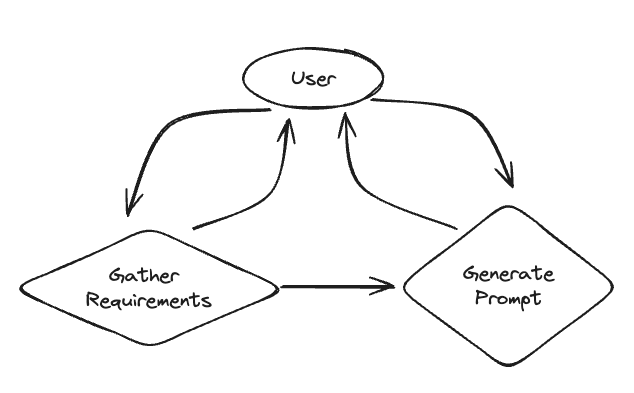
所以,这个 AI 助手需要两个阶段:
阶段一:信息收集                  阶段二:生成提示词
┌─────────────────┐             ┌─────────────────┐
│  询问用户需求    │  ──────────► │  根据需求生成    │
│  收集完整信息    │   信息齐全    │  提示词模板      │
└─────────────────┘             └─────────────────┘
        ▲                              │
        │                              │
        └──── 用户补充信息 ◄────────────┘
用户反馈优化核心挑战:如何让 AI 自己判断"信息收集完毕,可以开始生成了"?
这就是本案例要解决的问题!
系统架构图
上图展示了整个系统的工作流程:从开始到信息收集,再到提示词生成,最后结束。
二、环境准备
%%capture --no-stderr
% pip install -U langgraph langchain_openaiimport getpass
import os
def _set_env(var: str):
if not os.environ.get(var):
os.environ[var] = getpass.getpass(f"{var}: ")
_set_env("OPENAI_API_KEY")三、阶段一:信息收集
3.1 定义收集目标
首先,我们要明确需要收集哪些信息。用 Pydantic 定义一个结构:
from typing import List

from langchain_core.messages import SystemMessage
from langchain_openai import ChatOpenAI

from pydantic import BaseModeltemplate = """Your job is to get information from a user about what type of prompt template they want to create.
You should get the following information from them:
- What the objective of the prompt is
- What variables will be passed into the prompt template
- Any constraints for what the output should NOT do
- Any requirements that the output MUST adhere to
If you are not able to discern this info, ask them to clarify! Do not attempt to wildly guess.
After you are able to discern all the information, call the relevant tool."""
def get_messages_info(messages):
return [SystemMessage(content=template)] + messages
class PromptInstructions(BaseModel):
"""Instructions on how to prompt the LLM."""
objective: str
variables: List[str]
constraints: List[str]
requirements: List[str]
llm = ChatOpenAI(temperature=0)
llm_with_tool = llm.bind_tools([PromptInstructions])
def info_chain(state):
messages = get_messages_info(state["messages"])
response = llm_with_tool.invoke(messages)
return {"messages": [response]}代码解读:
| 组件 | 作用 |
|---|---|
template | 系统提示词,告诉 AI 它的任务是收集信息 |
PromptInstructions | Pydantic 模型,定义要收集的 4 个字段 |
llm_with_tool | 绑定了工具的 LLM,当信息收集完毕时调用工具 |
info_chain | 信息收集节点的处理函数 |
关键设计:PromptInstructions 不仅仅是一个数据结构,它还被当作工具绑定给 LLM。当 LLM 判断信息已经收集齐全时,它会"调用"这个工具,把收集到的信息填入结构中。
这个设计非常巧妙——用工具调用来标志状态转换!
四、阶段二:生成提示词
4.1 定义生成逻辑
from langchain_core.messages import AIMessage, HumanMessage, ToolMessage

# New system prompt
prompt_system = """Based on the following requirements, write a good prompt template:

{reqs}"""


# Function to get the messages for the prompt
# Will only get messages AFTER the tool call
def get_prompt_messages(messages: list):
    tool_call = None
    other_msgs = []
    for m in messages:
        if isinstance(m, AIMessage) and m.tool_calls:
            tool_call = m.tool_calls[0]["args"]
        elif isinstance(m, ToolMessage):
            continue
        elif tool_call is not None:
            other_msgs.append(m)
    return [SystemMessage(content=prompt_system.format(reqs=tool_call))] + other_msgs


def prompt_gen_chain(state):
    messages = get_prompt_messages(state["messages"])
    response = llm.invoke(messages)
return {"messages": [response]}代码解读:
get_prompt_messages 函数做了两件重要的事:
- 提取工具调用参数:找到
PromptInstructions工具调用,获取收集到的需求信息 - 过滤历史消息:只保留工具调用之后的消息(用于后续的优化对话)
消息历史:
  ├── HumanMessage: "hi!"                    ← 忽略(工具调用前)
  ├── AIMessage: "请提供信息..."              ← 忽略
  ├── HumanMessage: "目标是RAG..."           ← 忽略
  ├── AIMessage: [tool_call]                 ← 提取参数作为需求
  ├── ToolMessage: "Prompt generated!"       ← 忽略
  ├── HumanMessage: "再优化一下"              ← 保留(用于优化)
└── ...五、状态转换逻辑(核心!)
5.1 如何决定当前状态?
from typing import Literal

from langgraph.graph import END


def get_state(state):
    messages = state["messages"]
    if isinstance(messages[-1], AIMessage) and messages[-1].tool_calls:
        return "add_tool_message"
    elif not isinstance(messages[-1], HumanMessage):
        return END
return "info"状态判断逻辑:
| 条件 | 下一个状态 | 说明 |
|---|---|---|
| 最后一条是 AIMessage 且有 tool_calls | add_tool_message | AI 调用了工具,说明信息收集完毕 |
| 最后一条不是 HumanMessage | END | AI 已回复,等待用户输入 |
| 最后一条是 HumanMessage | info | 用户有新输入,继续收集信息 |
六、构建完整的图
from langgraph.checkpoint.memory import InMemorySaver
from langgraph.graph import StateGraph, START
from langgraph.graph.message import add_messages
from typing import Annotated
from typing_extensions import TypedDict


class State(TypedDict):
    messages: Annotated[list, add_messages]


memory = InMemorySaver()
workflow = StateGraph(State)
workflow.add_node("info", info_chain)
workflow.add_node("prompt", prompt_gen_chain)


@workflow.add_node
def add_tool_message(state: State):
    return {
        "messages": [
            ToolMessage(
                content="Prompt generated!",
                tool_call_id=state["messages"][-1].tool_calls[0]["id"],
            )
        ]
    }


workflow.add_conditional_edges("info", get_state, ["add_tool_message", "info", END])
workflow.add_edge("add_tool_message", "prompt")
workflow.add_edge("prompt", END)
workflow.add_edge(START, "info")
graph = workflow.compile(checkpointer=memory)代码解读:
| 代码 | 作用 |
|---|---|
workflow.add_node("info", info_chain) | 添加信息收集节点 |
workflow.add_node("prompt", prompt_gen_chain) | 添加提示词生成节点 |
@workflow.add_node + add_tool_message | 添加工具消息节点(过渡用) |
add_conditional_edges | 根据 get_state 的返回值决定下一步 |
checkpointer=memory | 启用状态持久化,支持多轮对话 |
为什么需要 add_tool_message 节点?
因为 OpenAI 的 API 要求:如果 AI 消息包含 tool_calls,后面必须跟一个 ToolMessage。这是一个"桥梁"节点,用于满足 API 要求。
七、可视化图结构
from IPython.display import Image, display

display(Image(graph.get_graph().draw_mermaid_png()))生成的图结构如下:
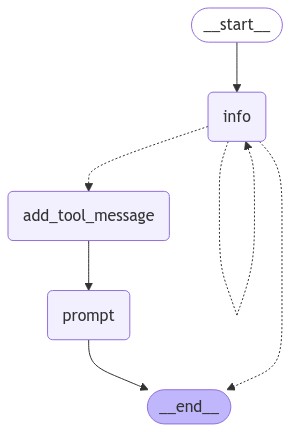
图解说明:
__start__→info:对话从信息收集节点开始info节点有三个出口:- 循环回自己(继续收集信息)
- 到
add_tool_message(信息齐全,准备生成) - 到
__end__(等待用户输入)
add_tool_message→prompt:添加工具响应后生成提示词prompt→__end__:生成完毕,结束
八、运行效果演示
import uuid

cached_human_responses = ["hi!", "rag prompt", "1 rag, 2 none, 3 no, 4 no", "red", "q"]
cached_response_index = 0
config = {"configurable": {"thread_id": str(uuid.uuid4())}}
while True:
    try:
        user = input("User (q/Q to quit): ")
    except:
        user = cached_human_responses[cached_response_index]
        cached_response_index += 1
    print(f"User (q/Q to quit): {user}")
    if user in {"q", "Q"}:
        print("AI: Byebye")
        break
    output = None
    for output in graph.stream(
        {"messages": [HumanMessage(content=user)]}, config=config, stream_mode="updates"
    ):
        last_message = next(iter(output.values()))["messages"][-1]
        last_message.pretty_print()

    if output and "prompt" in output:
print("Done!")完整运行结果:
User (q/Q to quit): hi!
================================== Ai Message ==================================

Hello! How can I assist you today?

User (q/Q to quit): rag prompt
================================== Ai Message ==================================

Sure! I can help you create a prompt template. To get started, could you please provide me with the following information:

1. What is the objective of the prompt?
2. What variables will be passed into the prompt template?
3. Any constraints for what the output should NOT do?
4. Any requirements that the output MUST adhere to?

Once I have this information, I can assist you in creating the prompt template.

User (q/Q to quit): 1 rag, 2 none, 3 no, 4 no
================================== Ai Message ==================================
Tool Calls:
  PromptInstructions (call_tcz0foifsaGKPdZmsZxNnepl)
 Call ID: call_tcz0foifsaGKPdZmsZxNnepl
  Args:
    objective: rag
    variables: ['none']
    constraints: ['no']
    requirements: ['no']

================================= Tool Message =================================

Prompt generated!

================================== Ai Message ==================================

Please write a response using the RAG (Red, Amber, Green) rating system.
Done!

User (q/Q to quit): red
================================== Ai Message ==================================

Response: The status is RED.

User (q/Q to quit): q
AI: Byebye九、对话流程分析
让我们逐轮分析这个对话:
| 轮次 | 用户输入 | AI 响应 | 当前状态 | 状态转换 |
|---|---|---|---|---|
| 1 | "hi!" | 问候并询问需求 | info | info → END(等用户) |
| 2 | "rag prompt" | 询问 4 个具体问题 | info | info → END |
| 3 | "1 rag, 2 none, 3 no, 4 no" | 调用 PromptInstructions 工具 | info | info → add_tool_message → prompt → END |
| 4 | "red" | 基于生成的提示词回复 | prompt | prompt → END |
关键转折点:第 3 轮!
当用户提供了所有信息后,AI 自动判断信息已齐全,调用了 PromptInstructions 工具。这触发了状态从 info 转换到 prompt。
十、这个设计的精妙之处
10.1 用工具调用实现状态转换
传统做法可能是让 AI 输出一个特殊标记(如 "[DONE]"),然后代码解析。
但这个案例用工具调用来实现状态转换:
- 工具调用是结构化的,不会有解析错误
- 工具参数直接就是收集到的信息,不用再提取
- LLM 原生支持,不需要额外 prompt engineering
10.2 消息过滤实现上下文隔离
get_prompt_messages 函数只保留工具调用之后的消息。这样:
- 提示词生成不会被之前的闲聊干扰
- 但用户可以基于生成结果继续优化(第 4 轮的 "red")
10.3 状态机 + 对话历史
通过 checkpointer=memory,整个对话历史被持久化。即使状态在 info 和 prompt 之间切换,历史消息都保留着。
十一、实战扩展
11.1 添加更多收集字段
class PromptInstructions(BaseModel):
    """Instructions on how to prompt the LLM."""

    objective: str
    variables: List[str]
    constraints: List[str]
    requirements: List[str]
    # 新增字段
    tone: str  # 语气(正式/轻松/专业等)
    output_format: str  # 输出格式(JSON/Markdown/纯文本等)
examples: List[str] # 用户提供的示例11.2 添加提示词优化循环
def get_state(state):
    messages = state["messages"]
    if isinstance(messages[-1], AIMessage) and messages[-1].tool_calls:
        return "add_tool_message"
    elif not isinstance(messages[-1], HumanMessage):
        return END

    # 新增:检查是否已经生成过提示词
    has_prompt = any(
        isinstance(m, AIMessage) and "prompt" in m.content.lower()
        for m in messages
    )
    if has_prompt:
        return "refine"  # 进入优化状态
return "info"11.3 添加确认环节
在生成提示词后,可以添加一个确认节点:
confirm_template = """You just generated the following prompt:

{prompt}

Ask the user if they are satisfied with this prompt, or if they want any changes."""十二、总结
本案例展示了 LangGraph 的一个重要设计模式:多阶段对话。
| 要点 | 说明 |
|---|---|
| 状态定义 | 用节点表示不同的对话阶段(info、prompt) |
| 状态转换 | 用工具调用触发阶段切换 |
| 上下文管理 | 消息过滤实现阶段间的上下文隔离 |
| 持久化 | checkpointer 保存完整对话历史 |
这种模式适用于:
- 表单填写类对话(收集信息 → 提交)
- 多步骤任务(规划 → 执行 → 确认)
- 角色切换(客服 → 技术支持 → 销售)