
代码助手:RAG + 自我纠正的代码生成
本文基于 LangGraph 官方教程进行解读,原始 Notebook 地址:langgraph_code_assistant.ipynb
一、这个案例要解决什么问题?
AlphaCodium 提出了一种使用控制流进行代码生成的方法。核心思想来自 Andrej Karpathy 的观点:迭代地构建编程问题的答案。
AlphaCodium 会在公共测试和 AI 生成的测试上迭代地测试和改进答案。
本案例将使用 LangGraph 从零实现这些想法:
- 从用户指定的一组文档开始
- 使用长上下文 LLM 摄取文档,并基于 RAG 回答问题
- 调用工具生成结构化输出
- 在返回给用户之前执行两项单元测试(检查导入和代码执行)
系统架构图
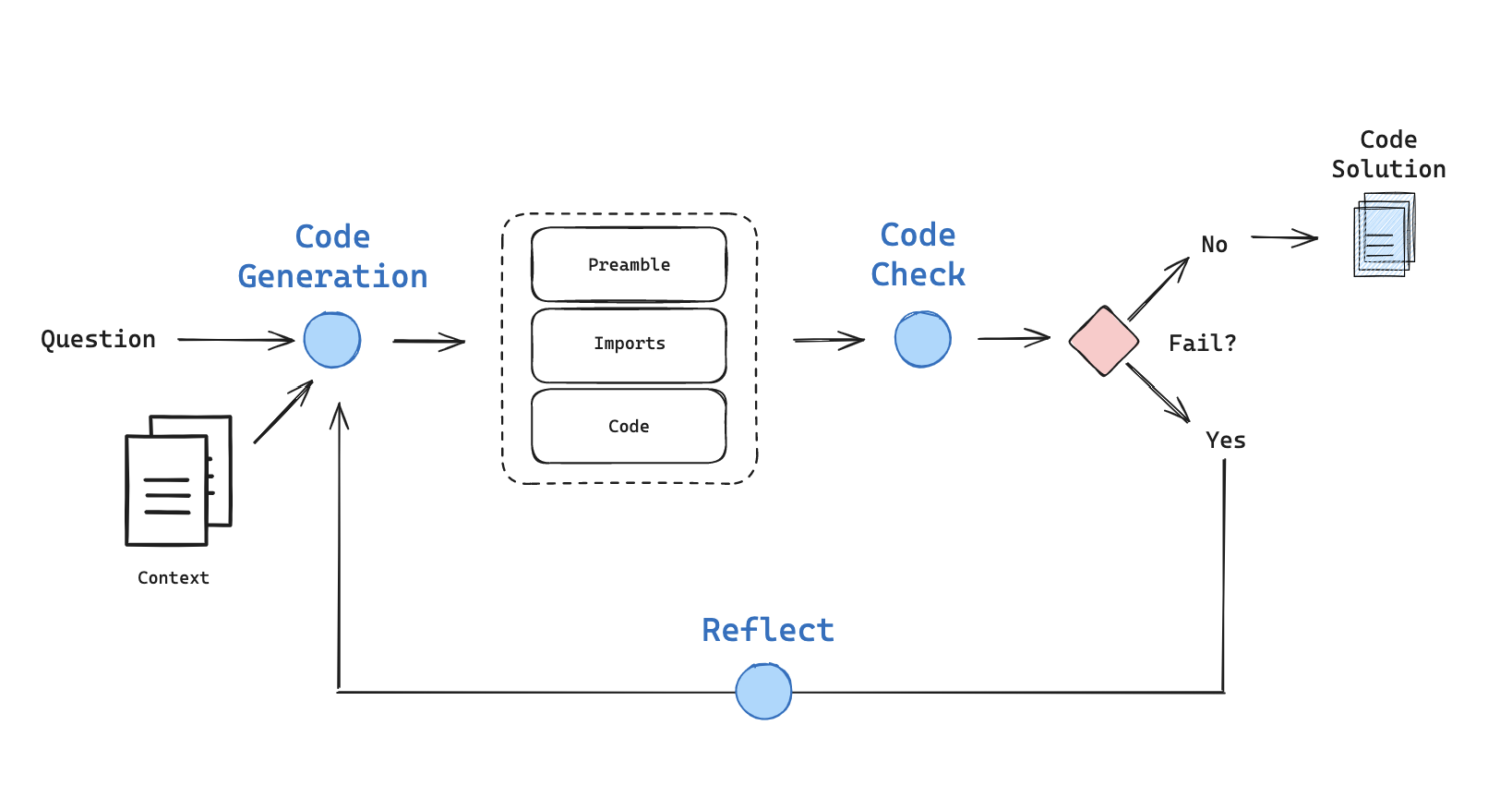
上图展示了整个系统的工作流程:生成代码 → 检查代码 → 根据结果决定是否重试或反思。
二、环境准备
2.1 安装依赖
! pip install -U langchain_community langchain-openai langchain-anthropic langchain langgraph bs42.2 设置 API Key
import getpass
import os


def _set_env(var: str):
    if not os.environ.get(var):
        os.environ[var] = getpass.getpass(f"{var}: ")


_set_env("OPENAI_API_KEY")
_set_env("ANTHROPIC_API_KEY")提示: 建议设置 LangSmith 来追踪和调试 LangGraph 项目。LangSmith 可以帮助你使用追踪数据来调试、测试和监控你的 LLM 应用。了解更多
三、加载文档
本案例使用 LangChain Expression Language (LCEL) 文档作为示例。
from bs4 import BeautifulSoup as Soup
from langchain_community.document_loaders.recursive_url_loader import RecursiveUrlLoader

# LCEL docs
url = "https://python.langchain.com/docs/concepts/lcel/"
loader = RecursiveUrlLoader(
    url=url, max_depth=20, extractor=lambda x: Soup(x, "html.parser").text
)
docs = loader.load()

# Sort the list based on the URLs and get the text
d_sorted = sorted(docs, key=lambda x: x.metadata["source"])
d_reversed = list(reversed(d_sorted))
concatenated_content = "\n\n\n --- \n\n\n".join(
    [doc.page_content for doc in d_reversed]
)代码解读:
| 组件 | 作用 |
|---|---|
RecursiveUrlLoader | 递归爬取 URL 页面,最大深度 20 层 |
BeautifulSoup | 提取 HTML 中的纯文本 |
concatenated_content | 将所有文档拼接成一个长字符串,用于 RAG |
四、代码生成链
4.1 定义代码结构
首先定义代码输出的结构化格式:
注意:本 notebook 使用 Pydantic v2
BaseModel,需要langchain-core >= 0.3。使用langchain-core < 0.3会因为混用 Pydantic v1 和 v2 的BaseModel而报错。
from langchain_core.prompts import ChatPromptTemplate
from langchain_openai import ChatOpenAI
from pydantic import BaseModel, Field


# Data model
class code(BaseModel):
    """Schema for code solutions to questions about LCEL."""

    prefix: str = Field(description="Description of the problem and approach")
    imports: str = Field(description="Code block import statements")
code: str = Field(description="Code block not including import statements")结构解读:
| 字段 | 说明 |
|---|---|
prefix | 问题描述和解决方案概述 |
imports | 代码的导入语句(单独分离便于测试) |
code | 主体代码(不包含导入) |
4.2 OpenAI 代码生成链
### OpenAI

# Grader prompt
code_gen_prompt = ChatPromptTemplate.from_messages(
    [
        (
            "system",
            """You are a coding assistant with expertise in LCEL, LangChain expression language. \n
    Here is a full set of LCEL documentation:  \n ------- \n  {context} \n ------- \n Answer the user
    question based on the above provided documentation. Ensure any code you provide can be executed \n
    with all required imports and variables defined. Structure your answer with a description of the code solution. \n
    Then list the imports. And finally list the functioning code block. Here is the user question:""",
        ),
        ("placeholder", "{messages}"),
    ]
)


expt_llm = "gpt-4o-mini"
llm = ChatOpenAI(temperature=0, model=expt_llm)
code_gen_chain_oai = code_gen_prompt | llm.with_structured_output(code)
question = "How do I build a RAG chain in LCEL?"
solution = code_gen_chain_oai.invoke(
    {"context": concatenated_content, "messages": [("user", question)]}
)
solution输出结果:
code(prefix='To build a Retrieval-Augmented Generation (RAG) chain in LCEL, you will need to set up a chain that combines a retriever and a language model (LLM). The retriever will fetch relevant documents based on a query, and the LLM will generate a response using the retrieved documents as context. Here's how you can do it:', imports='from langchain_core.prompts import ChatPromptTemplate\nfrom langchain_openai import ChatOpenAI\nfrom langchain_core.output_parsers import StrOutputParser\nfrom langchain_core.retrievers import MyRetriever', code='# Define the retriever\nretriever = MyRetriever() # Replace with your specific retriever implementation\n\n# Define the LLM model\nmodel = ChatOpenAI(model="gpt-4")\n\n# Create a prompt template for the LLM\nprompt_template = ChatPromptTemplate.from_template("Given the following documents, answer the question: {question}\nDocuments: {documents}")\n\n# Create the RAG chain\nrag_chain = prompt_template | retriever | model | StrOutputParser()\n\n# Example usage\nquery = "What are the benefits of using RAG?"\nresponse = rag_chain.invoke({"question": query})\nprint(response)')4.3 Anthropic Claude 代码生成链
Claude 需要特殊处理,因为工具调用可能会失败。我们添加了重试机制:
from langchain_anthropic import ChatAnthropic
from langchain_core.prompts import ChatPromptTemplate

### Anthropic

# Prompt to enforce tool use
code_gen_prompt_claude = ChatPromptTemplate.from_messages(
    [
        (
            "system",
            """<instructions> You are a coding assistant with expertise in LCEL, LangChain expression language. \n
    Here is the LCEL documentation:  \n ------- \n  {context} \n ------- \n Answer the user  question based on the \n
    above provided documentation. Ensure any code you provide can be executed with all required imports and variables \n
    defined. Structure your answer: 1) a prefix describing the code solution, 2) the imports, 3) the functioning code block. \n
    Invoke the code tool to structure the output correctly. </instructions> \n Here is the user question:""",
        ),
        ("placeholder", "{messages}"),
    ]
)


# LLM
expt_llm = "claude-3-opus-20240229"
llm = ChatAnthropic(
    model=expt_llm,
    default_headers={"anthropic-beta": "tools-2024-04-04"},
)

structured_llm_claude = llm.with_structured_output(code, include_raw=True)


# Optional: Check for errors in case tool use is flaky
def check_claude_output(tool_output):
    """Check for parse error or failure to call the tool"""

    # Error with parsing
    if tool_output["parsing_error"]:
        # Report back output and parsing errors
        print("Parsing error!")
        raw_output = str(tool_output["raw"].content)
        error = tool_output["parsing_error"]
        raise ValueError(
            f"Error parsing your output! Be sure to invoke the tool. Output: {raw_output}. \n Parse error: {error}"
        )

    # Tool was not invoked
    elif not tool_output["parsed"]:
        print("Failed to invoke tool!")
        raise ValueError(
            "You did not use the provided tool! Be sure to invoke the tool to structure the output."
        )
    return tool_output


# Chain with output check
code_chain_claude_raw = (
    code_gen_prompt_claude | structured_llm_claude | check_claude_output
)


def insert_errors(inputs):
    """Insert errors for tool parsing in the messages"""

    # Get errors
    error = inputs["error"]
    messages = inputs["messages"]
    messages += [
        (
            "assistant",
            f"Retry. You are required to fix the parsing errors: {error} \n\n You must invoke the provided tool.",
        )
    ]
    return {
        "messages": messages,
        "context": inputs["context"],
    }


# This will be run as a fallback chain
fallback_chain = insert_errors | code_chain_claude_raw
N = 3  # Max re-tries
code_gen_chain_re_try = code_chain_claude_raw.with_fallbacks(
    fallbacks=[fallback_chain] * N, exception_key="error"
)


def parse_output(solution):
    """When we add 'include_raw=True' to structured output,
    it will return a dict w 'raw', 'parsed', 'parsing_error'."""

    return solution["parsed"]


# Optional: With re-try to correct for failure to invoke tool
code_gen_chain = code_gen_chain_re_try | parse_output

# No re-try
code_gen_chain = code_gen_prompt_claude | structured_llm_claude | parse_output代码解读:
| 组件 | 作用 |
|---|---|
check_claude_output | 检查 Claude 是否正确调用了工具 |
insert_errors | 将错误信息插入消息中用于重试 |
with_fallbacks | 设置重试机制,最多重试 3 次 |
parse_output | 从结构化输出中提取解析后的结果 |
4.4 测试 Claude 生成
# Test
question = "How do I build a RAG chain in LCEL?"
solution = code_gen_chain.invoke(
    {"context": concatenated_content, "messages": [("user", question)]}
)
solution输出结果:
code(prefix="To build a RAG (Retrieval Augmented Generation) chain in LCEL, you can use a retriever to fetch relevant documents and then pass those documents to a chat model to generate a response based on the retrieved context. Here's an example of how to do this:", imports='from langchain_expressions import retrieve, chat_completion', code='question = "What is the capital of France?"\n\nrelevant_docs = retrieve(question)\n\nresult = chat_completion(\n model=\'openai-gpt35\', \n messages=[\n {{{"role": "system", "content": "Answer the question based on the retrieved context.}}},\n {{{"role": "user", "content": \'\'\'\n Context: {relevant_docs}\n Question: {question}\n \'\'\'}}\n ]\n)\n\nprint(result)')五、定义图状态
状态是一个字典,包含代码生成相关的键(错误、问题、代码生成结果):
from typing import List
from typing_extensions import TypedDict


class GraphState(TypedDict):
    """
    Represents the state of our graph.

    Attributes:
        error : Binary flag for control flow to indicate whether test error was tripped
        messages : With user question, error messages, reasoning
        generation : Code solution
        iterations : Number of tries
    """

    error: str
    messages: List
    generation: str
iterations: int状态字段说明:
| 字段 | 类型 | 说明 |
|---|---|---|
error | str | 二元标志,表示是否触发了测试错误 |
messages | List | 包含用户问题、错误消息、推理过程 |
generation | str | 代码解决方案 |
iterations | int | 尝试次数 |
六、构建图
6.1 定义参数和节点
### Parameter

# Max tries
max_iterations = 3
# Reflect
# flag = 'reflect'
flag = "do not reflect"

### Nodes


def generate(state: GraphState):
    """
    Generate a code solution

    Args:
        state (dict): The current graph state

    Returns:
        state (dict): New key added to state, generation
    """

    print("---GENERATING CODE SOLUTION---")

    # State
    messages = state["messages"]
    iterations = state["iterations"]
    error = state["error"]

    # We have been routed back to generation with an error
    if error == "yes":
        messages += [
            (
                "user",
                "Now, try again. Invoke the code tool to structure the output with a prefix, imports, and code block:",
            )
        ]

    # Solution
    code_solution = code_gen_chain.invoke(
        {"context": concatenated_content, "messages": messages}
    )
    messages += [
        (
            "assistant",
            f"{code_solution.prefix} \n Imports: {code_solution.imports} \n Code: {code_solution.code}",
        )
    ]

    # Increment
    iterations = iterations + 1
    return {"generation": code_solution, "messages": messages, "iterations": iterations}


def code_check(state: GraphState):
    """
    Check code

    Args:
        state (dict): The current graph state

    Returns:
        state (dict): New key added to state, error
    """

    print("---CHECKING CODE---")

    # State
    messages = state["messages"]
    code_solution = state["generation"]
    iterations = state["iterations"]

    # Get solution components
    imports = code_solution.imports
    code = code_solution.code

    # Check imports
    try:
        exec(imports)
    except Exception as e:
        print("---CODE IMPORT CHECK: FAILED---")
        error_message = [("user", f"Your solution failed the import test: {e}")]
        messages += error_message
        return {
            "generation": code_solution,
            "messages": messages,
            "iterations": iterations,
            "error": "yes",
        }

    # Check execution
    try:
        exec(imports + "\n" + code)
    except Exception as e:
        print("---CODE BLOCK CHECK: FAILED---")
        error_message = [("user", f"Your solution failed the code execution test: {e}")]
        messages += error_message
        return {
            "generation": code_solution,
            "messages": messages,
            "iterations": iterations,
            "error": "yes",
        }

    # No errors
    print("---NO CODE TEST FAILURES---")
    return {
        "generation": code_solution,
        "messages": messages,
        "iterations": iterations,
        "error": "no",
    }


def reflect(state: GraphState):
    """
    Reflect on errors

    Args:
        state (dict): The current graph state

    Returns:
        state (dict): New key added to state, generation
    """

    print("---GENERATING CODE SOLUTION---")

    # State
    messages = state["messages"]
    iterations = state["iterations"]
    code_solution = state["generation"]

    # Prompt reflection

    # Add reflection
    reflections = code_gen_chain.invoke(
        {"context": concatenated_content, "messages": messages}
    )
    messages += [("assistant", f"Here are reflections on the error: {reflections}")]
    return {"generation": code_solution, "messages": messages, "iterations": iterations}


### Edges


def decide_to_finish(state: GraphState):
    """
    Determines whether to finish.

    Args:
        state (dict): The current graph state

    Returns:
        str: Next node to call
    """
    error = state["error"]
    iterations = state["iterations"]

    if error == "no" or iterations == max_iterations:
        print("---DECISION: FINISH---")
        return "end"
    else:
        print("---DECISION: RE-TRY SOLUTION---")
        if flag == "reflect":
            return "reflect"
        else:
return "generate"节点功能解读:
| 节点 | 功能 |
|---|---|
generate | 生成代码解决方案 |
code_check | 检查代码(导入测试 + 执行测试) |
reflect | 反思错误(可选) |
decide_to_finish | 决定是否完成或重试 |
代码检查的两个阶段:
- 导入检查:使用
exec(imports)验证导入语句是否有效 - 执行检查:使用
exec(imports + "\n" + code)验证完整代码是否可执行
6.2 构建图结构
from langgraph.graph import END, StateGraph, START

workflow = StateGraph(GraphState)

# Define the nodes
workflow.add_node("generate", generate)  # generation solution
workflow.add_node("check_code", code_check)  # check code
workflow.add_node("reflect", reflect)  # reflect

# Build graph
workflow.add_edge(START, "generate")
workflow.add_edge("generate", "check_code")
workflow.add_conditional_edges(
    "check_code",
    decide_to_finish,
    {
        "end": END,
        "reflect": "reflect",
        "generate": "generate",
    },
)
workflow.add_edge("reflect", "generate")
app = workflow.compile()

# 🎨 可视化图结构
from IPython.display import Image, display
display(Image(app.get_graph().draw_mermaid_png()))图结构解读:
          ┌─────────────────────────────────────────┐
          │                                         │
          ▼                                         │
┌───────────────┐     ┌─────────────┐     ┌────────┴────────┐
│   generate    │────►│ check_code  │────►│ decide_to_finish│
└───────────────┘     └─────────────┘     └─────────────────┘
          ▲                                         │
          │                                         │
          │         ┌─────────────┐                 │
          └─────────│   reflect   │◄────────────────┘
└─────────────┘ (if flag == "reflect")七、运行测试
question = "How can I directly pass a string to a runnable and use it to construct the input needed for my prompt?"
solution = app.invoke({"messages": [("user", question)], "iterations": 0, "error": ""})运行输出:
---GENERATING CODE SOLUTION---
---CHECKING CODE---
---CODE IMPORT CHECK: FAILED---
---DECISION: RE-TRY SOLUTION---
---GENERATING CODE SOLUTION---
---CHECKING CODE---
---CODE IMPORT CHECK: FAILED---
---DECISION: RE-TRY SOLUTION---
---GENERATING CODE SOLUTION---
---CHECKING CODE---
---CODE BLOCK CHECK: FAILED---
---DECISION: FINISH---查看最终生成结果:
solution["generation"]输出:
code(prefix='To directly pass a string to a runnable and use it to construct the input needed for a prompt, you can use the `_from_value` method on a PromptTemplate in LCEL. Create a PromptTemplate with the desired template string, then call `_from_value` on it with a dictionary mapping the input variable names to their values. This will return a PromptValue that you can pass directly to any chain or model that accepts a prompt input.', imports='from langchain_core.prompts import PromptTemplate', code='user_string = "langchain is awesome"\n\nprompt_template = PromptTemplate.from_template("Tell me more about how {user_input}.")\n\nprompt_value = prompt_template._from_value({"user_input": user_string})\n\n# Pass the PromptValue directly to a model or chain \nchain.run(prompt_value)')运行分析:
可以看到系统进行了 3 次尝试:
- 第 1 次:导入检查失败
- 第 2 次:导入检查失败
- 第 3 次:代码执行检查失败,但达到最大迭代次数,结束
这展示了自我纠正机制的工作过程——系统会尝试多次修复代码中的问题。
八、评估(Eval)
8.1 数据集
这里 是一个公开的 LCEL 问题数据集。
数据集名称为 lcel-teacher-eval。你也可以在 GitHub 找到 CSV 文件。
import langsmith

client = langsmith.Client()# Clone the dataset to your tenant to use it
try:
public_dataset = (
"https://smith.langchain.com/public/326674a6-62bd-462d-88ae-eea49d503f9d/d"
)
client.clone_public_dataset(public_dataset)
except:
print("Please setup LangSmith")输出:
Dataset(name='lcel-teacher-eval', description='Eval set for LCEL teacher', data_type=<DataType.kv: 'kv'>, id=UUID('8b57696d-14ea-4f00-9997-b3fc74a16846'), created_at=datetime.datetime(2024, 9, 16, 22, 50, 4, 169288, tzinfo=datetime.timezone.utc), modified_at=datetime.datetime(2024, 9, 16, 22, 50, 4, 169288, tzinfo=datetime.timezone.utc), example_count=0, session_count=0, last_session_start_time=None, inputs_schema=None, outputs_schema=None)8.2 自定义评估器
from langsmith.schemas import Example, Run


def check_import(run: Run, example: Example) -> dict:
    imports = run.outputs.get("imports")
    try:
        exec(imports)
        return {"key": "import_check", "score": 1}
    except Exception:
        return {"key": "import_check", "score": 0}


def check_execution(run: Run, example: Example) -> dict:
    imports = run.outputs.get("imports")
    code = run.outputs.get("code")
    try:
        exec(imports + "\n" + code)
        return {"key": "code_execution_check", "score": 1}
    except Exception:
return {"key": "code_execution_check", "score": 0}评估器说明:
| 评估器 | 检查内容 | 评分 |
|---|---|---|
check_import | 导入语句是否有效 | 1(通过)/ 0(失败) |
check_execution | 完整代码是否可执行 | 1(通过)/ 0(失败) |
8.3 对比实验
对比 LangGraph(带重试循环)和 Context Stuffing(基础方案):
def predict_base_case(example: dict):
    """Context stuffing"""
    solution = code_gen_chain.invoke(
        {"context": concatenated_content, "messages": [("user", example["question"])]}
    )
    return {"imports": solution.imports, "code": solution.code}


def predict_langgraph(example: dict):
    """LangGraph"""
    graph = app.invoke(
        {"messages": [("user", example["question"])], "iterations": 0, "error": ""}
    )
    solution = graph["generation"]
return {"imports": solution.imports, "code": solution.code}from langsmith.evaluation import evaluate
# Evaluator
code_evalulator = [check_import, check_execution]
# Dataset
dataset_name = "lcel-teacher-eval"运行基础方案评估:
# Run base case
try:
    experiment_results_ = evaluate(
        predict_base_case,
        data=dataset_name,
        evaluators=code_evalulator,
        experiment_prefix=f"test-without-langgraph-{expt_llm}",
        max_concurrency=2,
        metadata={
            "llm": expt_llm,
        },
    )
except:
print("Please setup LangSmith")运行 LangGraph 方案评估:
# Run with langgraph
try:
    experiment_results = evaluate(
        predict_langgraph,
        data=dataset_name,
        evaluators=code_evalulator,
        experiment_prefix=f"test-with-langgraph-{expt_llm}-{flag}",
        max_concurrency=2,
        metadata={
            "llm": expt_llm,
            "feedback": flag,
        },
    )
except:
print("Please setup LangSmith")九、实验结果
评估结果可以在 LangSmith 上查看:https://smith.langchain.com/public/78a3d858-c811-4e46-91cb-0f10ef56260b/d
关键发现:
| 发现 | 说明 |
|---|---|
| LangGraph 优于基础方案 | 添加重试循环能显著提升性能 |
| 反思机制没有帮助 | 在重试前进行反思反而导致性能下降,不如直接将错误传回 LLM |
| GPT-4 优于 Claude3 | Claude3 有工具调用错误问题(Opus 有 3 次失败,Haiku 有 1 次) |
十、这个设计的精妙之处
10.1 结构化输出 + 分离测试
将代码输出分成三部分(prefix、imports、code)的设计非常巧妙:
- prefix:让 LLM 先描述方案,有助于理清思路
- imports:单独分离便于独立测试
- code:主体代码,与导入分开测试
10.2 迭代自我纠正
生成代码 → 测试失败 → 错误信息反馈 → 重新生成 → 再次测试...这个循环模仿了人类程序员的工作方式:
- 写代码
- 运行/测试
- 查看错误
- 修复
- 重复直到通过
10.3 渐进式检查
先检查导入,再检查执行。这样可以更精确地定位问题:
- 导入失败 → 库名错误或不存在
- 执行失败 → 逻辑错误或语法问题
10.4 可配置的反思机制
通过 flag 参数可以选择是否在重试前进行反思。实验表明,对于代码生成任务,直接重试比反思更有效。
十一、实战扩展
11.1 增加测试用例检查
def code_check_with_tests(state: GraphState):
    """Check code with unit tests"""

    code_solution = state["generation"]
    imports = code_solution.imports
    code = code_solution.code

    # 基础检查
    try:
        exec(imports)
    except Exception as e:
        return {**state, "error": "yes", "messages": state["messages"] + [
            ("user", f"Import error: {e}")
        ]}

    # 添加单元测试
    test_cases = [
        "assert 'langchain' in dir()",  # 检查是否导入了 langchain
        "assert callable(chain.invoke)",  # 检查 chain 是否有 invoke 方法
    ]

    for test in test_cases:
        try:
            exec(imports + "\n" + code + "\n" + test)
        except Exception as e:
            return {**state, "error": "yes", "messages": state["messages"] + [
                ("user", f"Test failed: {test}, Error: {e}")
            ]}

return {**state, "error": "no"}11.2 添加静态代码分析
import ast

def static_analysis(code_str: str) -> list:
    """Perform static analysis on code"""
    warnings = []

    try:
        tree = ast.parse(code_str)

        # 检查未使用的导入
        # 检查未定义的变量
        # 检查潜在的类型错误

    except SyntaxError as e:
        warnings.append(f"Syntax error: {e}")

return warnings11.3 支持更多语言
class MultiLangCode(BaseModel):
    """Schema for multi-language code solutions"""

    language: str = Field(description="Programming language")
    prefix: str = Field(description="Description of the solution")
    dependencies: str = Field(description="Package dependencies")
    code: str = Field(description="Main code block")
test_code: str = Field(description="Test code to verify the solution")十二、总结
本案例展示了 LangGraph 的一个重要设计模式:带自我纠正的代码生成。
| 要点 | 说明 |
|---|---|
| 结构化输出 | 将代码分成 prefix/imports/code 三部分 |
| 迭代纠正 | 通过测试-失败-重试循环改进代码 |
| 渐进式检查 | 先检查导入,再检查执行 |
| 可配置反思 | 可选择是否在重试前进行反思 |
这种模式适用于:
- 代码生成和自动修复
- SQL 查询生成
- 配置文件生成
- 任何需要验证输出正确性的生成任务
核心思想:不要期望一次生成正确答案,而是通过测试和迭代逐步改进。