
层级式多智能体团队(Hierarchical Agent Teams)
本文基于 LangGraph 官方教程整理
概述
在之前的示例([Agent Supervisor](./12.2 Supervisor Simple Example.md))中,我们介绍了单个 Supervisor 节点 在不同 Worker 节点之间路由工作的概念。
但如果单个 Worker 的工作变得太复杂怎么办?如果 Worker 的数量变得太多怎么办?
对于某些应用程序,如果工作是层级式分布的,系统可能会更有效。
你可以通过组合不同的子图(subgraph)来实现这一点,创建一个顶层 Supervisor,以及中层 Supervisor。
为了演示这一点,让我们构建一个简单的研究助手!图的结构如下所示:
架构图
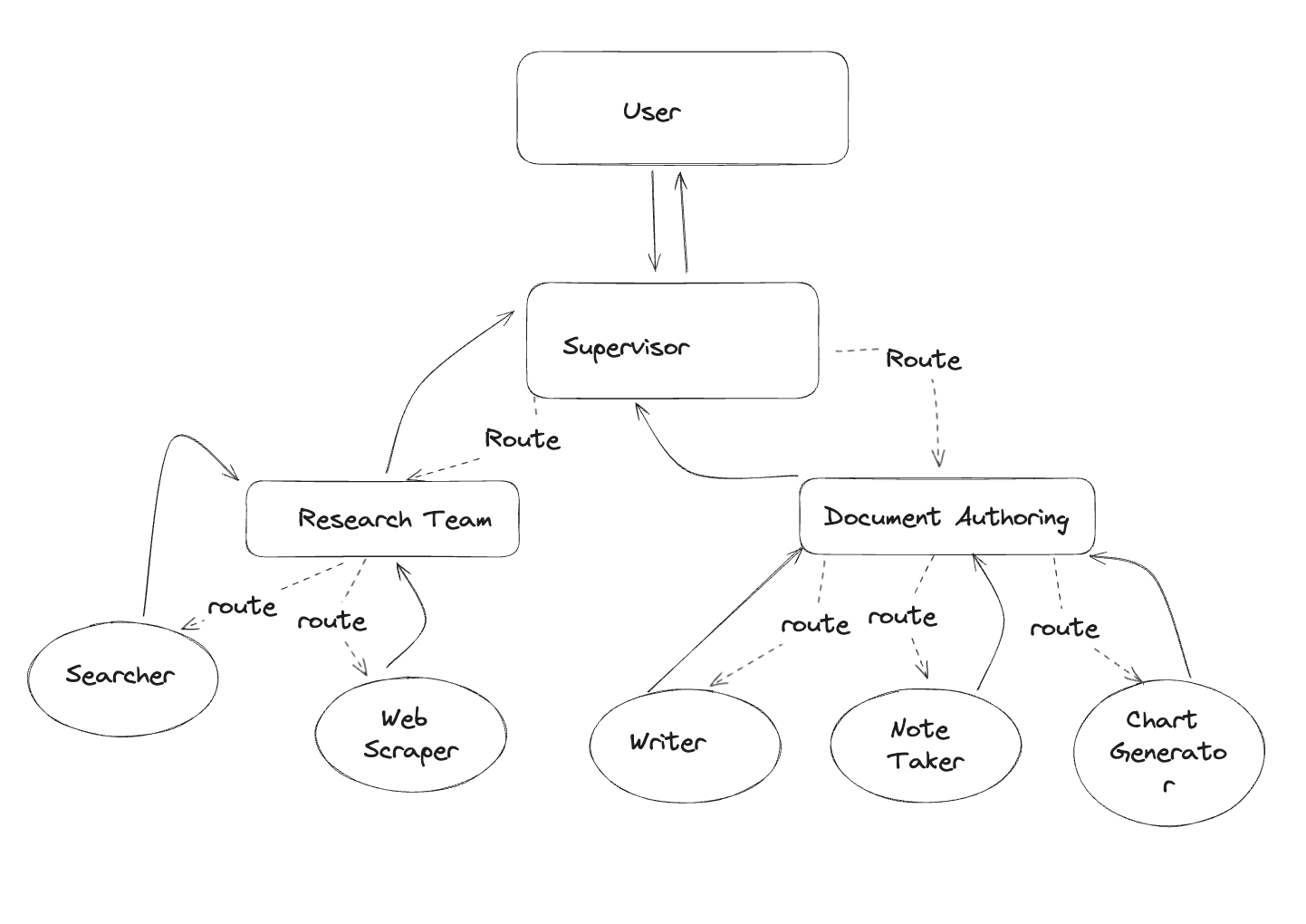
本教程的灵感来自论文 AutoGen: Enabling Next-Gen LLM Applications via Multi-Agent Conversation(Wu 等人)。在本教程的其余部分,你将:
- 定义 Agent 的工具来访问网络和写入文件
- 定义一些工具函数来帮助创建图和 Agent
- 创建并定义每个团队(网络研究 + 文档写作)
- 将所有内容组合在一起
环境准备
首先,让我们安装所需的包并设置 API 密钥:
pip install -U langgraph langchain_community langchain_anthropic langchain-tavily langchain_experimentalimport getpass
import os
def _set_if_undefined(var: str):
if not os.environ.get(var):
os.environ[var] = getpass.getpass(f"Please provide your {var}")
_set_if_undefined("OPENAI_API_KEY")
_set_if_undefined("TAVILY_API_KEY")💡 提示:建议设置 LangSmith 来追踪和调试你的 LangGraph 项目。
创建工具
每个团队将由一个或多个 Agent 组成,每个 Agent 拥有一个或多个工具。下面,定义不同团队将使用的所有工具。
研究团队工具
研究团队可以使用搜索引擎和 URL 抓取器在网上查找信息:
from typing import Annotated, List

from langchain_community.document_loaders import WebBaseLoader
from langchain_tavily import TavilySearch
from langchain_core.tools import tool

tavily_tool = TavilySearch(max_results=5)

@tool
def scrape_webpages(urls: List[str]) -> str:
    """Use requests and bs4 to scrape the provided web pages for detailed information."""
    loader = WebBaseLoader(urls)
    docs = loader.load()
    return "\n\n".join(
        [
            f'<Document name="{doc.metadata.get("title", "")}">\n{doc.page_content}\n</Document>'
            for doc in docs
        ]
)文档写作团队工具
接下来,我们为文档写作团队提供一些工具。我们在下面定义了一些基本的文件访问工具:
⚠️ 注意:这会让 Agent 访问你的文件系统,在某些情况下可能不安全。
from pathlib import Path
from tempfile import TemporaryDirectory
from typing import Dict, Optional

from langchain_experimental.utilities import PythonREPL
from typing_extensions import TypedDict

_TEMP_DIRECTORY = TemporaryDirectory()
WORKING_DIRECTORY = Path(_TEMP_DIRECTORY.name)

@tool
def create_outline(
    points: Annotated[List[str], "List of main points or sections."],
    file_name: Annotated[str, "File path to save the outline."],
) -> Annotated[str, "Path of the saved outline file."]:
    """Create and save an outline."""
    with (WORKING_DIRECTORY / file_name).open("w") as file:
        for i, point in enumerate(points):
            file.write(f"{i + 1}. {point}\n")
    return f"Outline saved to {file_name}"

@tool
def read_document(
    file_name: Annotated[str, "File path to read the document from."],
    start: Annotated[Optional[int], "The start line. Default is 0"] = None,
    end: Annotated[Optional[int], "The end line. Default is None"] = None,
) -> str:
    """Read the specified document."""
    with (WORKING_DIRECTORY / file_name).open("r") as file:
        lines = file.readlines()
    if start is None:
        start = 0
    return "\n".join(lines[start:end])

@tool
def write_document(
    content: Annotated[str, "Text content to be written into the document."],
    file_name: Annotated[str, "File path to save the document."],
) -> Annotated[str, "Path of the saved document file."]:
    """Create and save a text document."""
    with (WORKING_DIRECTORY / file_name).open("w") as file:
        file.write(content)
    return f"Document saved to {file_name}"

@tool
def edit_document(
    file_name: Annotated[str, "Path of the document to be edited."],
    inserts: Annotated[
        Dict[int, str],
        "Dictionary where key is the line number (1-indexed) and value is the text to be inserted at that line.",
    ],
) -> Annotated[str, "Path of the edited document file."]:
    """Edit a document by inserting text at specific line numbers."""

    with (WORKING_DIRECTORY / file_name).open("r") as file:
        lines = file.readlines()

    sorted_inserts = sorted(inserts.items())

    for line_number, text in sorted_inserts:
        if 1 <= line_number <= len(lines) + 1:
            lines.insert(line_number - 1, text + "\n")
        else:
            return f"Error: Line number {line_number} is out of range."

    with (WORKING_DIRECTORY / file_name).open("w") as file:
        file.writelines(lines)

    return f"Document edited and saved to {file_name}"

# Warning: This executes code locally, which can be unsafe when not sandboxed
repl = PythonREPL()

@tool
def python_repl_tool(
    code: Annotated[str, "The python code to execute to generate your chart."],
):
    """Use this to execute python code. If you want to see the output of a value,
    you should print it out with `print(...)`. This is visible to the user."""
    try:
        result = repl.run(code)
    except BaseException as e:
        return f"Failed to execute. Error: {repr(e)}"
return f"Successfully executed:\n```python\n{code}\n```\nStdout: {result}"辅助工具函数
我们将创建一些工具函数,以便更简洁地:
- 创建 Worker Agent
- 为子图创建 Supervisor
这些函数将简化最后的图组合代码,让我们更容易看清发生了什么。
from typing import List, Optional, Literal
from langchain_core.language_models.chat_models import BaseChatModel

from langgraph.graph import StateGraph, MessagesState, START, END
from langgraph.types import Command
from langchain_core.messages import HumanMessage, trim_messages

class State(MessagesState):
    next: str

def make_supervisor_node(llm: BaseChatModel, members: list[str]) -> str:
    options = ["FINISH"] + members
    system_prompt = (
        "You are a supervisor tasked with managing a conversation between the"
        f" following workers: {members}. Given the following user request,"
        " respond with the worker to act next. Each worker will perform a"
        " task and respond with their results and status. When finished,"
        " respond with FINISH."
    )

    class Router(TypedDict):
        """Worker to route to next. If no workers needed, route to FINISH."""
        next: Literal[*options]

    def supervisor_node(state: State) -> Command[Literal[*members, "__end__"]]:
        """An LLM-based router."""
        messages = [
            {"role": "system", "content": system_prompt},
        ] + state["messages"]
        response = llm.with_structured_output(Router).invoke(messages)
        goto = response["next"]
        if goto == "FINISH":
            goto = END

        return Command(goto=goto, update={"next": goto})

return supervisor_node定义 Agent 团队
现在我们可以开始定义层级式团队了。
研究团队
研究团队将有一个搜索 Agent 和一个网页抓取 Agent("research_agent")作为两个 Worker 节点。让我们创建它们,以及团队 Supervisor:
from langchain_core.messages import HumanMessage
from langchain_openai import ChatOpenAI
from langgraph.prebuilt import create_react_agent

llm = ChatOpenAI(model="gpt-4o")

search_agent = create_react_agent(llm, tools=[tavily_tool])

def search_node(state: State) -> Command[Literal["supervisor"]]:
    result = search_agent.invoke(state)
    return Command(
        update={
            "messages": [
                HumanMessage(content=result["messages"][-1].content, name="search")
            ]
        },
        # We want our workers to ALWAYS "report back" to the supervisor when done
        goto="supervisor",
    )

web_scraper_agent = create_react_agent(llm, tools=[scrape_webpages])

def web_scraper_node(state: State) -> Command[Literal["supervisor"]]:
    result = web_scraper_agent.invoke(state)
    return Command(
        update={
            "messages": [
                HumanMessage(content=result["messages"][-1].content, name="web_scraper")
            ]
        },
        # We want our workers to ALWAYS "report back" to the supervisor when done
        goto="supervisor",
    )

research_supervisor_node = make_supervisor_node(llm, ["search", "web_scraper"])现在我们已经创建了必要的组件,定义它们的交互变得很简单。将节点添加到团队图中,并定义边(确定转换条件):
research_builder = StateGraph(State)
research_builder.add_node("supervisor", research_supervisor_node)
research_builder.add_node("search", search_node)
research_builder.add_node("web_scraper", web_scraper_node)

research_builder.add_edge(START, "supervisor")
research_graph = research_builder.compile()研究团队图结构
from IPython.display import Image, display
display(Image(research_graph.get_graph().draw_mermaid_png()))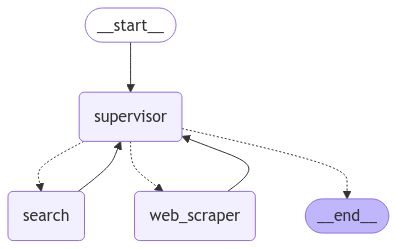
测试研究团队
我们可以直接给这个团队分配工作。试试下面的例子:
for s in research_graph.stream(
    {"messages": [("user", "when is Taylor Swift's next tour?")]},
    {"recursion_limit": 100},
):
    print(s)
print("---")输出示例:
{'supervisor': {'next': 'search'}}
---
{'search': {'messages': [HumanMessage(content="Taylor Swift's next tour is The Eras Tour, which includes both U.S. and international dates...", name='search')]}}
---
{'supervisor': {'next': 'web_scraper'}}
---
{'web_scraper': {'messages': [HumanMessage(content='Taylor Swift\'s next tour is "The Eras Tour." Here are some of the upcoming international dates for 2024:\n\n1. **Toronto, ON, Canada** at Rogers Centre\n   - November 21, 2024\n   - November 22, 2024\n   - November 23, 2024\n\n2. **Vancouver, BC, Canada** at BC Place\n   - December 6, 2024\n   - December 7, 2024\n   - December 8, 2024', name='web_scraper')]}}
---
{'supervisor': {'next': '__end__'}}
---文档写作团队
使用类似的方法创建文档写作团队。这次,我们将给每个 Agent 访问不同的文件写入工具。
⚠️ 注意:这里我们让 Agent 访问文件系统,这在所有情况下都可能不安全。
llm = ChatOpenAI(model="gpt-4o")

doc_writer_agent = create_react_agent(
    llm,
    tools=[write_document, edit_document, read_document],
    prompt=(
        "You can read, write and edit documents based on note-taker's outlines. "
        "Don't ask follow-up questions."
    ),
)

def doc_writing_node(state: State) -> Command[Literal["supervisor"]]:
    result = doc_writer_agent.invoke(state)
    return Command(
        update={
            "messages": [
                HumanMessage(content=result["messages"][-1].content, name="doc_writer")
            ]
        },
        goto="supervisor",
    )

note_taking_agent = create_react_agent(
    llm,
    tools=[create_outline, read_document],
    prompt=(
        "You can read documents and create outlines for the document writer. "
        "Don't ask follow-up questions."
    ),
)

def note_taking_node(state: State) -> Command[Literal["supervisor"]]:
    result = note_taking_agent.invoke(state)
    return Command(
        update={
            "messages": [
                HumanMessage(content=result["messages"][-1].content, name="note_taker")
            ]
        },
        goto="supervisor",
    )

chart_generating_agent = create_react_agent(
    llm, tools=[read_document, python_repl_tool]
)

def chart_generating_node(state: State) -> Command[Literal["supervisor"]]:
    result = chart_generating_agent.invoke(state)
    return Command(
        update={
            "messages": [
                HumanMessage(
                    content=result["messages"][-1].content, name="chart_generator"
                )
            ]
        },
        goto="supervisor",
    )

doc_writing_supervisor_node = make_supervisor_node(
    llm, ["doc_writer", "note_taker", "chart_generator"]
)创建好对象后,我们可以构建图:
paper_writing_builder = StateGraph(State)
paper_writing_builder.add_node("supervisor", doc_writing_supervisor_node)
paper_writing_builder.add_node("doc_writer", doc_writing_node)
paper_writing_builder.add_node("note_taker", note_taking_node)
paper_writing_builder.add_node("chart_generator", chart_generating_node)

paper_writing_builder.add_edge(START, "supervisor")
paper_writing_graph = paper_writing_builder.compile()文档写作团队图结构
from IPython.display import Image, display
display(Image(paper_writing_graph.get_graph().draw_mermaid_png()))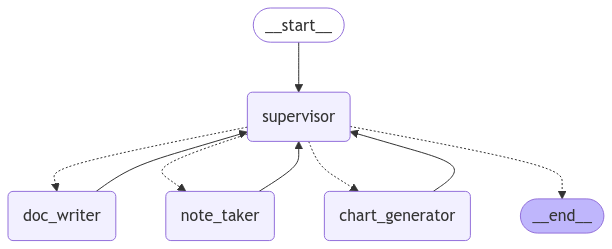
测试文档写作团队
for s in paper_writing_graph.stream(
    {
        "messages": [
            (
                "user",
                "Write an outline for poem about cats and then write the poem to disk.",
            )
        ]
    },
    {"recursion_limit": 100},
):
    print(s)
print("---")输出示例:
{'supervisor': {'next': 'note_taker'}}
---
{'note_taker': {'messages': [HumanMessage(content='The outline for the poem about cats has been created and saved as "cats_poem_outline.txt".', name='note_taker')]}}
---
{'supervisor': {'next': 'doc_writer'}}
---
{'doc_writer': {'messages': [HumanMessage(content='The poem about cats has been written and saved as "cats_poem.txt".', name='doc_writer')]}}
---
{'supervisor': {'next': '__end__'}}
---添加层级
在这个设计中,我们强制执行自上而下的规划策略。我们已经创建了两个图,但我们必须决定如何在两者之间路由工作。
我们将创建第三个图来编排前两个图,并添加一些连接器来定义顶层状态如何在不同图之间共享。
from langchain_core.messages import BaseMessage

llm = ChatOpenAI(model="gpt-4o")

teams_supervisor_node = make_supervisor_node(llm, ["research_team", "writing_team"])

def call_research_team(state: State) -> Command[Literal["supervisor"]]:
    response = research_graph.invoke({"messages": state["messages"][-1]})
    return Command(
        update={
            "messages": [
                HumanMessage(
                    content=response["messages"][-1].content, name="research_team"
                )
            ]
        },
        goto="supervisor",
    )

def call_paper_writing_team(state: State) -> Command[Literal["supervisor"]]:
    response = paper_writing_graph.invoke({"messages": state["messages"][-1]})
    return Command(
        update={
            "messages": [
                HumanMessage(
                    content=response["messages"][-1].content, name="writing_team"
                )
            ]
        },
        goto="supervisor",
    )

# Define the graph.
super_builder = StateGraph(State)
super_builder.add_node("supervisor", teams_supervisor_node)
super_builder.add_node("research_team", call_research_team)
super_builder.add_node("writing_team", call_paper_writing_team)

super_builder.add_edge(START, "supervisor")
super_graph = super_builder.compile()顶层图结构
from IPython.display import Image, display
display(Image(super_graph.get_graph().draw_mermaid_png()))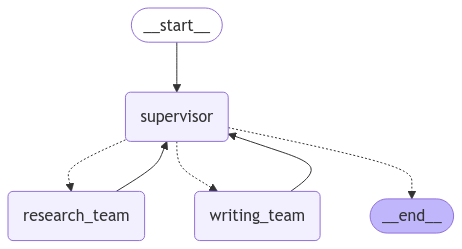
完整测试
让我们测试完整的层级式系统:
for s in super_graph.stream(
    {
        "messages": [
            ("user", "Research AI agents and write a brief report about them.")
        ],
    },
    {"recursion_limit": 150},
):
    print(s)
print("---")输出示例:
{'supervisor': {'next': 'research_team'}}
---
{'research_team': {'messages': [HumanMessage(content="**AI Agents Overview 2023**\n\nAI agents are sophisticated technologies that automate and enhance various processes across industries...\n\n**Popular AI Agents in 2023:**\n1. **Auto GPT**: This agent is renowned for its seamless integration abilities...\n2. **ChartGPT**: Specializing in data visualization...\n3. **LLMops**: With advanced language capabilities...\n\n**Market Trends:**\nThe AI agents market is experiencing rapid growth...\n\n**Key Players:**\nLeading companies such as Microsoft, IBM, Google, Oracle, and AWS...\n\n**Applications in Healthcare:**\nIn healthcare, AI agents are automating routine tasks...\n\n**Future Prospects:**\nThe future of AI agents is promising...", name='research_team')]}}
---
{'supervisor': {'next': 'writing_team'}}
---
{'writing_team': {'messages': [HumanMessage(content='The documents have been successfully created and saved:\n\n1. **AI_Agents_Overview_2023.txt** - Contains the detailed overview of AI agents in 2023.\n2. **AI_Agents_Overview_2023_Outline.txt** - Contains the outline of the document.', name='writing_team')]}}
---
{'supervisor': {'next': '__end__'}}
---完整案例代码
以下是本教程的完整代码,可以直接复制运行:
"""
层级式多智能体团队(Hierarchical Agent Teams)
来源:https://github.com/langchain-ai/langgraph/blob/main/docs/docs/tutorials/multi_agent/hierarchical_agent_teams.ipynb
"""

import getpass
import os
from pathlib import Path
from tempfile import TemporaryDirectory
from typing import Annotated, List, Dict, Optional, Literal

from langchain_community.document_loaders import WebBaseLoader
from langchain_tavily import TavilySearch
from langchain_core.tools import tool
from langchain_core.language_models.chat_models import BaseChatModel
from langchain_core.messages import HumanMessage, BaseMessage
from langchain_openai import ChatOpenAI
from langchain_experimental.utilities import PythonREPL
from typing_extensions import TypedDict

from langgraph.graph import StateGraph, MessagesState, START, END
from langgraph.types import Command
from langgraph.prebuilt import create_react_agent


# ==================== 环境配置 ====================
def _set_if_undefined(var: str):
    if not os.environ.get(var):
        os.environ[var] = getpass.getpass(f"Please provide your {var}")

_set_if_undefined("OPENAI_API_KEY")
_set_if_undefined("TAVILY_API_KEY")


# ==================== 研究团队工具 ====================
tavily_tool = TavilySearch(max_results=5)

@tool
def scrape_webpages(urls: List[str]) -> str:
    """Use requests and bs4 to scrape the provided web pages for detailed information."""
    loader = WebBaseLoader(urls)
    docs = loader.load()
    return "\n\n".join(
        [
            f'<Document name="{doc.metadata.get("title", "")}">\n{doc.page_content}\n</Document>'
            for doc in docs
        ]
    )


# ==================== 文档写作团队工具 ====================
_TEMP_DIRECTORY = TemporaryDirectory()
WORKING_DIRECTORY = Path(_TEMP_DIRECTORY.name)

@tool
def create_outline(
    points: Annotated[List[str], "List of main points or sections."],
    file_name: Annotated[str, "File path to save the outline."],
) -> Annotated[str, "Path of the saved outline file."]:
    """Create and save an outline."""
    with (WORKING_DIRECTORY / file_name).open("w") as file:
        for i, point in enumerate(points):
            file.write(f"{i + 1}. {point}\n")
    return f"Outline saved to {file_name}"

@tool
def read_document(
    file_name: Annotated[str, "File path to read the document from."],
    start: Annotated[Optional[int], "The start line. Default is 0"] = None,
    end: Annotated[Optional[int], "The end line. Default is None"] = None,
) -> str:
    """Read the specified document."""
    with (WORKING_DIRECTORY / file_name).open("r") as file:
        lines = file.readlines()
    if start is None:
        start = 0
    return "\n".join(lines[start:end])

@tool
def write_document(
    content: Annotated[str, "Text content to be written into the document."],
    file_name: Annotated[str, "File path to save the document."],
) -> Annotated[str, "Path of the saved document file."]:
    """Create and save a text document."""
    with (WORKING_DIRECTORY / file_name).open("w") as file:
        file.write(content)
    return f"Document saved to {file_name}"

@tool
def edit_document(
    file_name: Annotated[str, "Path of the document to be edited."],
    inserts: Annotated[
        Dict[int, str],
        "Dictionary where key is the line number (1-indexed) and value is the text to be inserted at that line.",
    ],
) -> Annotated[str, "Path of the edited document file."]:
    """Edit a document by inserting text at specific line numbers."""
    with (WORKING_DIRECTORY / file_name).open("r") as file:
        lines = file.readlines()
    sorted_inserts = sorted(inserts.items())
    for line_number, text in sorted_inserts:
        if 1 <= line_number <= len(lines) + 1:
            lines.insert(line_number - 1, text + "\n")
        else:
            return f"Error: Line number {line_number} is out of range."
    with (WORKING_DIRECTORY / file_name).open("w") as file:
        file.writelines(lines)
    return f"Document edited and saved to {file_name}"

repl = PythonREPL()

@tool
def python_repl_tool(
    code: Annotated[str, "The python code to execute to generate your chart."],
):
    """Use this to execute python code."""
    try:
        result = repl.run(code)
    except BaseException as e:
        return f"Failed to execute. Error: {repr(e)}"
    return f"Successfully executed:\n```python\n{code}\n```\nStdout: {result}"


# ==================== 状态定义 ====================
class State(MessagesState):
    next: str


# ==================== Supervisor 工厂函数 ====================
def make_supervisor_node(llm: BaseChatModel, members: list[str]):
    options = ["FINISH"] + members
    system_prompt = (
        "You are a supervisor tasked with managing a conversation between the"
        f" following workers: {members}. Given the following user request,"
        " respond with the worker to act next. Each worker will perform a"
        " task and respond with their results and status. When finished,"
        " respond with FINISH."
    )

    class Router(TypedDict):
        """Worker to route to next. If no workers needed, route to FINISH."""
        next: Literal[*options]

    def supervisor_node(state: State) -> Command[Literal[*members, "__end__"]]:
        """An LLM-based router."""
        messages = [
            {"role": "system", "content": system_prompt},
        ] + state["messages"]
        response = llm.with_structured_output(Router).invoke(messages)
        goto = response["next"]
        if goto == "FINISH":
            goto = END
        return Command(goto=goto, update={"next": goto})

    return supervisor_node


# ==================== 研究团队 ====================
llm = ChatOpenAI(model="gpt-4o")

search_agent = create_react_agent(llm, tools=[tavily_tool])

def search_node(state: State) -> Command[Literal["supervisor"]]:
    result = search_agent.invoke(state)
    return Command(
        update={
            "messages": [
                HumanMessage(content=result["messages"][-1].content, name="search")
            ]
        },
        goto="supervisor",
    )

web_scraper_agent = create_react_agent(llm, tools=[scrape_webpages])

def web_scraper_node(state: State) -> Command[Literal["supervisor"]]:
    result = web_scraper_agent.invoke(state)
    return Command(
        update={
            "messages": [
                HumanMessage(content=result["messages"][-1].content, name="web_scraper")
            ]
        },
        goto="supervisor",
    )

research_supervisor_node = make_supervisor_node(llm, ["search", "web_scraper"])

# 构建研究团队图
research_builder = StateGraph(State)
research_builder.add_node("supervisor", research_supervisor_node)
research_builder.add_node("search", search_node)
research_builder.add_node("web_scraper", web_scraper_node)
research_builder.add_edge(START, "supervisor")
research_graph = research_builder.compile()


# ==================== 文档写作团队 ====================
doc_writer_agent = create_react_agent(
    llm,
    tools=[write_document, edit_document, read_document],
    prompt=(
        "You can read, write and edit documents based on note-taker's outlines. "
        "Don't ask follow-up questions."
    ),
)

def doc_writing_node(state: State) -> Command[Literal["supervisor"]]:
    result = doc_writer_agent.invoke(state)
    return Command(
        update={
            "messages": [
                HumanMessage(content=result["messages"][-1].content, name="doc_writer")
            ]
        },
        goto="supervisor",
    )

note_taking_agent = create_react_agent(
    llm,
    tools=[create_outline, read_document],
    prompt=(
        "You can read documents and create outlines for the document writer. "
        "Don't ask follow-up questions."
    ),
)

def note_taking_node(state: State) -> Command[Literal["supervisor"]]:
    result = note_taking_agent.invoke(state)
    return Command(
        update={
            "messages": [
                HumanMessage(content=result["messages"][-1].content, name="note_taker")
            ]
        },
        goto="supervisor",
    )

chart_generating_agent = create_react_agent(llm, tools=[read_document, python_repl_tool])

def chart_generating_node(state: State) -> Command[Literal["supervisor"]]:
    result = chart_generating_agent.invoke(state)
    return Command(
        update={
            "messages": [
                HumanMessage(content=result["messages"][-1].content, name="chart_generator")
            ]
        },
        goto="supervisor",
    )

doc_writing_supervisor_node = make_supervisor_node(
    llm, ["doc_writer", "note_taker", "chart_generator"]
)

# 构建文档写作团队图
paper_writing_builder = StateGraph(State)
paper_writing_builder.add_node("supervisor", doc_writing_supervisor_node)
paper_writing_builder.add_node("doc_writer", doc_writing_node)
paper_writing_builder.add_node("note_taker", note_taking_node)
paper_writing_builder.add_node("chart_generator", chart_generating_node)
paper_writing_builder.add_edge(START, "supervisor")
paper_writing_graph = paper_writing_builder.compile()


# ==================== 顶层 Supervisor ====================
teams_supervisor_node = make_supervisor_node(llm, ["research_team", "writing_team"])

def call_research_team(state: State) -> Command[Literal["supervisor"]]:
    response = research_graph.invoke({"messages": state["messages"][-1]})
    return Command(
        update={
            "messages": [
                HumanMessage(content=response["messages"][-1].content, name="research_team")
            ]
        },
        goto="supervisor",
    )

def call_paper_writing_team(state: State) -> Command[Literal["supervisor"]]:
    response = paper_writing_graph.invoke({"messages": state["messages"][-1]})
    return Command(
        update={
            "messages": [
                HumanMessage(content=response["messages"][-1].content, name="writing_team")
            ]
        },
        goto="supervisor",
    )

# 构建顶层图
super_builder = StateGraph(State)
super_builder.add_node("supervisor", teams_supervisor_node)
super_builder.add_node("research_team", call_research_team)
super_builder.add_node("writing_team", call_paper_writing_team)
super_builder.add_edge(START, "supervisor")
super_graph = super_builder.compile()


# ==================== 运行测试 ====================
if __name__ == "__main__":
    print("=" * 50)
    print("层级式多智能体团队测试")
    print("=" * 50)

    for s in super_graph.stream(
        {
            "messages": [
                ("user", "Research AI agents and write a brief report about them.")
            ],
        },
        {"recursion_limit": 150},
    ):
        print(s)
print("---")关键要点
层级式架构的核心概念
                          ┌─────────────────────┐
                          │  Top-Level          │
                          │  Supervisor         │
                          └──────────┬──────────┘
                                     │
          ┌──────────────────────────┼──────────────────────────┐
          ↓                          ↓
┌─────────────────┐        ┌─────────────────┐
│  Research Team  │        │  Writing Team   │
│  Supervisor     │        │  Supervisor     │
└────────┬────────┘        └────────┬────────┘
         │                          │
  ┌──────┴──────┐            ┌──────┴──────────────┐
  ↓             ↓            ↓          ↓          ↓
┌─────────┐ ┌─────────┐ ┌─────────┐ ┌─────────┐ ┌─────────┐
│ Search  │ │ Scraper │ │  Note   │ │  Doc    │ │  Chart  │
│ Agent   │ │ Agent   │ │  Taker  │ │  Writer │ │  Gen    │
└─────────┘ └─────────┘ └─────────┘ └─────────┘ └─────────┘何时使用层级式架构?
| 场景 | 推荐方案 |
|---|---|
| 单个 Worker 工作太复杂 | 将其拆分为子团队 |
| Worker 数量太多 | 按职能分组,添加中层 Supervisor |
| 需要跨领域协作 | 顶层 Supervisor 协调不同团队 |
| 上下文管理困难 | 团队内部共享状态,团队间只传递结果 |
设计要点
- 子图封装:每个团队是一个独立的子图,有自己的 Supervisor
- 状态隔离:团队内部状态不暴露给其他团队
- 结果汇报:Worker 执行完毕后总是返回给 Supervisor
- 递归限制:设置合理的
recursion_limit防止无限循环
延伸阅读
思考题
- 如何在层级式架构中实现团队之间的直接通信?
- 如果研究团队和写作团队需要多次交互,应该如何设计?
- 如何监控整个层级式系统的执行过程?
下一节预告:我们将探索更多高级的多智能体协作模式,包括网络式架构和动态团队组建。