
LangGraph Chatbot with Message Summarization 详细解读
网站使用说明
📚 概述
本文档详细解读 LangGraph 中的 对话摘要(Message Summarization) 技术。这是一种智能的内存管理方案,通过 LLM 生成对话摘要来压缩历史消息,从而实现长期对话而不会产生高昂的 token 成本和延迟问题。
📚 术语表
| 术语名称 | LangGraph 定义和解读 | Python 定义和说明 | 重要程度 |
|---|---|---|---|
| 对话摘要 (Summarization) | 使用 LLM 将长对话历史压缩为简短摘要文本的技术 | 定期调用 LLM 生成摘要,保留关键信息,删除旧消息 | ⭐⭐⭐⭐⭐ |
| MessagesState | LangGraph 内置状态基类,包含 messages 字段和 add_messages reducer | TypedDict 类,可继承并添加 summary 等自定义字段 | ⭐⭐⭐⭐⭐ |
| RemoveMessage | 用于从状态中永久删除指定消息的特殊消息类型 | 格式 RemoveMessage(id=message.id),配合 add_messages 删除旧消息 | ⭐⭐⭐⭐⭐ |
| Checkpointer | LangGraph 负责保存和加载图状态的组件,实现持久化 | 接口类,MemorySaver 是内存实现,SqliteSaver 是数据库实现 | ⭐⭐⭐⭐⭐ |
| MemorySaver | 将状态保存在进程内存中的 Checkpointer 实现,重启后丢失 | from langgraph.checkpoint.memory import MemorySaver | ⭐⭐⭐⭐ |
| Thread | LangGraph 中用于隔离不同对话会话的概念,类似 Slack 频道 | 通过 config = {"configurable": {"thread_id": "1"}} 指定 | ⭐⭐⭐⭐⭐ |
| StateSnapshot | 图在某个时间点的完整状态快照,包含 values、config、metadata | graph.get_state(config) 返回的对象,可访问状态和元数据 | ⭐⭐⭐⭐ |
| 增量摘要 | 基于已有摘要扩展新内容,而不是重新摘要全部对话 | 提示词包含旧摘要:"Extend the summary by taking into account..." | ⭐⭐⭐⭐ |
| 条件边 | 根据状态决定下一步执行哪个节点的边,用于控制摘要触发 | add_conditional_edges("node", should_continue) 返回节点名或 END | ⭐⭐⭐⭐⭐ |
| 消息裁剪 | 删除旧消息但保留最近 N 条,通过列表切片实现 | messages[:-2] 删除除最后2条外的所有消息 | ⭐⭐⭐⭐⭐ |
🎯 核心概念
为什么需要对话摘要?
在构建聊天机器人时,我们面临一个根本性的矛盾:
- 长期记忆需求:用户期望机器人记住整个对话历史
- token 限制:LLM 有上下文窗口限制
- 成本与延迟:发送大量历史消息会增加成本和响应时间
三种消息管理策略对比
| 策略 | 优点 | 缺点 | 适用场景 |
|---|---|---|---|
| 完整保留 | 信息完整 | token 成本高、可能超限 | 短对话 |
| 裁剪/过滤 | 简单高效 | 丢失历史信息 | 简单对话 |
| 智能摘要 | 保留关键信息、控制成本 | 实现复杂度高 | 长期对话 |
本教程的解决方案: 使用 LLM 生成对话摘要,保留压缩的历史信息,支持长期对话。
🏗️ 系统架构
核心机制
用户消息流
    ↓
检查消息数量
    ↓
├─ ≤6 条消息 → 直接使用历史
│      ↓
│  [call_model] 生成回复
│      ↓
│    END
│
└─ >6 条消息 → 触发摘要
       ↓
   [summarize_conversation] 生成/更新摘要
       ↓
   保留最新 2 条消息 + 摘要
       ↓
END工作流程图
graph TD
    START --> conversation[call_model]
    conversation --> check{消息数 > 6?}
    check -->|No| END1[END]
    check -->|Yes| summarize[summarize_conversation]
summarize --> END2[END]🔧 代码实现详解
1. 环境设置
%%capture --no-stderr
%pip install --quiet -U langchain_core langgraph langchain_openai说明:
%%capture --no-stderr:Jupyter 魔法命令,隐藏安装输出(但保留错误)- 安装核心依赖:LangChain、LangGraph、OpenAI 集成
import os, getpass

def _set_env(var: str):
    if not os.environ.get(var):
        os.environ[var] = getpass.getpass(f"{var}: ")

_set_env("OPENAI_API_KEY")Python 知识点:环境变量管理
os.environ.get(var):获取环境变量,不存在返回Nonegetpass.getpass():安全地输入密码(不显示明文)- 这是生产环境的最佳实践:敏感信息不硬编码
2. LangSmith 追踪设置
_set_env("LANGSMITH_API_KEY")
os.environ["LANGSMITH_TRACING"] = "true"
os.environ["LANGSMITH_PROJECT"] = "langchain-academy"LangSmith 作用:
- 追踪每次 LLM 调用
- 可视化执行流程
- 调试和性能分析
3. 初始化模型
from langchain_openai import ChatOpenAI
model = ChatOpenAI(model="gpt-5-nano", temperature=0)参数说明:
model="gpt-5-nano":使用 GPT-4 Optimized 模型temperature=0:确定性输出(适合需要一致性的任务)
4. 定义状态(State)⭐
这是整个系统的核心!
from langgraph.graph import MessagesState

class State(MessagesState):
summary: strLangGraph 知识点:MessagesState
MessagesState 是 LangGraph 提供的内置状态基类:
class MessagesState(TypedDict):
messages: Annotated[list[AnyMessage], add_messages]关键特性:
- 自动消息管理:
messages字段已配置add_messagesreducer - 智能合并:新消息自动追加到历史
- ID 管理:每条消息有唯一 ID,支持删除/更新
我们的扩展:
class State(MessagesState):
summary: str # 新增摘要字段现在状态包含:
messages:消息列表(继承自 MessagesState)summary:对话摘要(新增)
Python 知识点:类继承
class State(MessagesState):
    # 继承 MessagesState 的所有字段和方法
summary: str # 添加新字段这是 Python 的单继承模式,State 拥有:
- 父类的
messages字段 - 自己的
summary字段
5. 对话节点:call_model ⭐
from langchain_core.messages import SystemMessage, HumanMessage, RemoveMessage

def call_model(state: State):
    # 获取摘要(如果存在)
    summary = state.get("summary", "")

    # 如果有摘要,添加到系统消息
    if summary:
        # 创建包含摘要的系统消息
        system_message = f"Summary of conversation earlier: {summary}"

        # 将摘要追加到消息历史前面
        messages = [SystemMessage(content=system_message)] + state["messages"]
    else:
        # 没有摘要,直接使用消息历史
        messages = state["messages"]

    # 调用 LLM
    response = model.invoke(messages)
return {"messages": response}代码解析:
步骤 1:检查是否有摘要
summary = state.get("summary", "")state.get("summary", ""):安全获取摘要,不存在返回空字符串- 避免
KeyError异常
步骤 2:构建消息列表
情况 A:有摘要
messages = [SystemMessage(content=system_message)] + state["messages"]消息结构:
[
    SystemMessage("Summary of conversation earlier: 用户叫 Lance,喜欢 49ers..."),
    HumanMessage("最新用户消息"),
    ...
]情况 B:无摘要
messages = state["messages"]直接使用原始历史。
步骤 3:调用模型并返回
response = model.invoke(messages)
return {"messages": response}model.invoke(messages):发送消息到 LLMreturn {"messages": response}:返回的字典会更新State.messages
LangGraph 知识点:状态更新机制
节点返回的字典会自动合并到状态:
# 当前 State.messages = [msg1, msg2]
return {"messages": response}
# 更新后 State.messages = [msg1, msg2, response]这是因为 add_messages reducer 会将新消息追加到列表。
6. 摘要节点:summarize_conversation ⭐⭐⭐
这是本教程的核心!
def summarize_conversation(state: State):
    # 第一步:获取现有摘要
    summary = state.get("summary", "")

    # 第二步:创建摘要提示
    if summary:
        # 已有摘要 → 增量更新
        summary_message = (
            f"This is summary of the conversation to date: {summary}\n\n"
            "Extend the summary by taking into account the new messages above:"
        )
    else:
        # 无摘要 → 首次创建
        summary_message = "Create a summary of the conversation above:"

    # 第三步:生成摘要
    messages = state["messages"] + [HumanMessage(content=summary_message)]
    response = model.invoke(messages)

    # 第四步:删除旧消息,只保留最新 2 条
    delete_messages = [RemoveMessage(id=m.id) for m in state["messages"][:-2]]

return {"summary": response.content, "messages": delete_messages}详细解析
步骤 1:检查现有摘要
summary = state.get("summary", "")判断是首次摘要还是更新摘要。
步骤 2:构建摘要提示
两种提示策略:
首次摘要(无现有摘要):
"Create a summary of the conversation above:"增量摘要(有现有摘要):
"This is summary of the conversation to date: {旧摘要}

Extend the summary by taking into account the new messages above:"
为什么使用增量摘要?
- 保留历史信息的连续性
- 避免重复摘要整个对话
- 只需处理新增消息
步骤 3:调用 LLM 生成摘要
messages = state["messages"] + [HumanMessage(content=summary_message)]
response = model.invoke(messages)消息结构:
[
    ...历史消息...,
    HumanMessage("Create a summary of the conversation above:")
]LLM 会基于所有历史生成摘要。
步骤 4:删除旧消息 ⭐
delete_messages = [RemoveMessage(id=m.id) for m in state["messages"][:-2]]关键知识点:RemoveMessage
RemoveMessage 是 LangGraph 提供的特殊消息类型,用于从状态中删除消息:
RemoveMessage(id=message_id)代码解析:
state["messages"][:-2]  # 除了最后 2 条消息外的所有消息
[RemoveMessage(id=m.id) for m in ...] # 为每条消息创建删除标记执行效果:
假设有 8 条消息:
[msg1, msg2, msg3, msg4, msg5, msg6, msg7, msg8]
                                     ^^^^^ ^^^^^ 保留最新 2 条
^^^^^^ ^^^^^^ ^^^^^^ ^^^^^^ ^^^^^^ 删除这 6 条删除后:
[msg7, msg8] # 只保留最新 2 条为什么保留 2 条?
- 最新的用户消息
- 最新的 AI 回复
- 确保对话连续性
步骤 5:返回更新
return {
    "summary": response.content,    # 更新摘要
    "messages": delete_messages     # 删除旧消息
}LangGraph 知识点:同时更新多个字段
一个节点可以返回多个字段的更新:
summary:存储新的摘要文本messages:应用删除操作(add_messagesreducer 会处理RemoveMessage)
7. 条件边:should_continue
from langgraph.graph import END
from typing_extensions import Literal

def should_continue(state: State) -> Literal["summarize_conversation", END]:
    """返回下一个要执行的节点"""

    messages = state["messages"]

    # 如果消息超过 6 条,进行摘要
    if len(messages) > 6:
        return "summarize_conversation"

    # 否则结束
return ENDPython 知识点:Literal 类型
from typing_extensions import Literal

def should_continue(state: State) -> Literal["summarize_conversation", END]:
...Literal 表示返回值只能是指定的字面量:
"summarize_conversation":字符串字面量END:LangGraph 的特殊常量
作用:
- 类型安全:IDE 会检查返回值
- 自动补全:IDE 会提示可能的返回值
LangGraph 知识点:条件边返回值
条件边函数的返回值决定下一个节点:
- 返回节点名称 → 跳转到该节点
- 返回
END→ 结束图执行
8. 添加内存(Memory)⭐⭐⭐
核心问题: 默认情况下,LangGraph 的状态是临时的,每次执行都是全新的。
解决方案: 使用 Checkpointer(检查点机制)持久化状态。
from langgraph.checkpoint.memory import MemorySaver

memory = MemorySaver()MemorySaver 作用:
- 内存中的键值存储
- 自动保存每一步的状态
- 支持多线程(thread)对话
LangGraph 知识点:状态持久化
graph = workflow.compile(checkpointer=memory)执行流程:
- 执行前:从 checkpointer 加载上次的状态
- 每个节点后:自动保存当前状态到 checkpointer
- 执行后:状态保留在 checkpointer 中
为什么重要?
- 支持长期对话:用户可以随时继续之前的对话
- 中断恢复:即使程序重启,对话历史依然存在
- 多用户隔离:不同 thread_id 的对话互不干扰
9. 构建图
from IPython.display import Image, display
from langgraph.checkpoint.memory import MemorySaver
from langgraph.graph import StateGraph, START

# 定义图
workflow = StateGraph(State)

# 添加节点
workflow.add_node("conversation", call_model)
workflow.add_node(summarize_conversation)  # 函数名自动作为节点名

# 设置入口
workflow.add_edge(START, "conversation")

# 添加条件边
workflow.add_conditional_edges("conversation", should_continue)

# 摘要后结束
workflow.add_edge("summarize_conversation", END)

# 编译(带内存)
memory = MemorySaver()
graph = workflow.compile(checkpointer=memory)

# 可视化
display(Image(graph.get_graph().draw_mermaid_png()))图结构分析:
START
  ↓
conversation (call_model)
  ↓
should_continue (条件判断)
  ├─ ≤6 条 → END
  └─ >6 条 → summarize_conversation
              ↓
ENDLangGraph 知识点:节点命名
workflow.add_node("conversation", call_model)  # 显式命名
workflow.add_node(summarize_conversation) # 使用函数名两种方式:
- 提供名称:
add_node(name, func) - 自动命名:
add_node(func)→ 使用函数名作为节点名
10. 线程(Threads)⭐⭐⭐
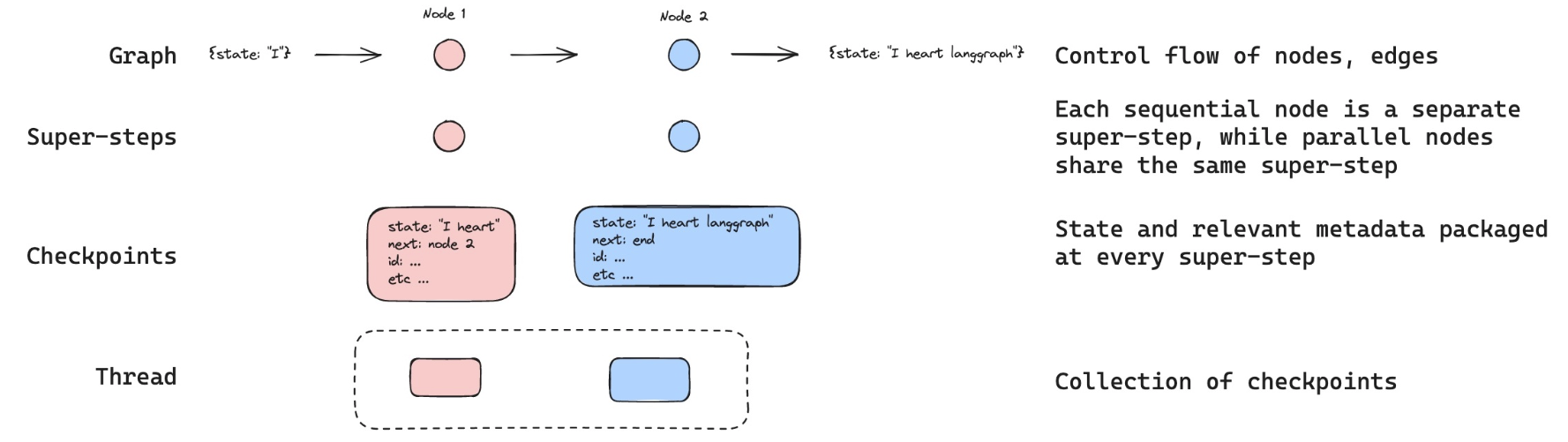
核心概念: Thread 是一组相关检查点的集合,类似于 Slack 的频道。
# 创建配置,指定线程 ID
config = {"configurable": {"thread_id": "1"}}Thread 的作用:
- 隔离对话:不同 thread_id 的对话互不影响
- 状态分组:同一 thread 内的所有检查点共享历史
- 多用户支持:每个用户使用独立的 thread_id
类比理解:
| 概念 | LangGraph | Slack |
|---|---|---|
| Thread | thread_id | 频道 |
| Checkpoint | 状态快照 | 消息历史 |
| State | 当前对话状态 | 当前频道内容 |
11. 执行对话
# 创建线程配置
config = {"configurable": {"thread_id": "1"}}

# 第一轮对话
input_message = HumanMessage(content="hi! I'm Lance")
output = graph.invoke({"messages": [input_message]}, config)
for m in output['messages'][-1:]:
m.pretty_print()输出:
================================== Ai Message ==================================

Hello Lance! How can I assist you today?执行流程:
- 检查 thread "1" 是否有历史 → 无
- 创建新状态:
{"messages": [HumanMessage("hi! I'm Lance")]} - 进入
conversation节点 - 无摘要,直接调用 LLM
- 返回 AI 回复
- 保存状态到 thread "1"
# 第二轮对话
input_message = HumanMessage(content="what's my name?")
output = graph.invoke({"messages": [input_message]}, config)
for m in output['messages'][-1:]:
m.pretty_print()输出:
================================== Ai Message ==================================

You mentioned that your name is Lance. How can I help you today?执行流程:
- 从 thread "1" 加载历史状态:
{"messages": [ HumanMessage("hi! I'm Lance"), AIMessage("Hello Lance!...") ]} - 追加新消息:
HumanMessage("what's my name?") - 调用 LLM(包含完整历史)
- AI 能回忆起名字是 "Lance"
- 保存更新后的状态
# 第三轮对话
input_message = HumanMessage(content="i like the 49ers!")
output = graph.invoke({"messages": [input_message]}, config)
for m in output['messages'][-1:]:
m.pretty_print()输出:
================================== Ai Message ==================================

That's great! The San Francisco 49ers have a rich history and a passionate fan base.
Do you have a favorite player or a memorable game that you particularly enjoyed?当前状态:
messages: [
    HumanMessage("hi! I'm Lance"),
    AIMessage("Hello Lance!..."),
    HumanMessage("what's my name?"),
    AIMessage("You mentioned that your name is Lance..."),
    HumanMessage("i like the 49ers!"),
    AIMessage("That's great! The San Francisco 49ers...")
]
summary: "" # 还未触发摘要此时有 6 条消息,尚未达到触发摘要的阈值(> 6)。
12. 检查摘要状态
graph.get_state(config).values.get("summary", "")输出:
''LangGraph 知识点:get_state API
state_snapshot = graph.get_state(config)
state_snapshot.values # 获取当前状态的所有值返回 StateSnapshot 对象:
values:当前状态字典next:下一个要执行的节点config:配置信息metadata:元数据
13. 触发摘要
# 第四轮对话(触发摘要)
input_message = HumanMessage(content="i like Nick Bosa, isn't he the highest paid defensive player?")
output = graph.invoke({"messages": [input_message]}, config)
for m in output['messages'][-1:]:
m.pretty_print()输出:
================================== Ai Message ==================================

Yes, as of September 2023, Nick Bosa became the highest-paid defensive player in NFL history.
He signed a five-year contract extension with the San Francisco 49ers worth $170 million,
with $122.5 million guaranteed. Bosa is known for his exceptional skills as a defensive end
and has been a key player for the 49ers.执行流程:
- 加载历史(6 条消息)
- 追加新消息 → 7 条消息
- 进入
conversation节点,生成回复 - 现在有 8 条消息 → 触发条件
len(messages) > 6 should_continue返回"summarize_conversation"- 进入
summarize_conversation节点:- 生成摘要
- 删除前 6 条消息
- 保留最新 2 条
- 状态更新:
messages: [最新 2 条消息]
summary: "Lance introduced himself and mentioned..."
14. 查看生成的摘要
graph.get_state(config).values.get("summary", "")输出:
'Lance introduced himself and mentioned that he is a fan of the San Francisco 49ers,
specifically highlighting his admiration for Nick Bosa. The conversation noted that
as of September 2023, Nick Bosa became the highest-paid defensive player in NFL history
with a five-year, $170 million contract extension with the 49ers.'摘要内容分析:
✅ 包含的信息:
- 用户名字:Lance
- 喜好:49ers 队粉丝
- 喜欢的球员:Nick Bosa
- 事实信息:Nick Bosa 的合同细节
✅ 压缩效果:
- 原始:8 条消息(数百 tokens)
- 摘要:1 段文字(约 50 tokens)
- 压缩比:约 80-90%
🎓 核心知识点总结
LangGraph 特有概念
1. MessagesState
内置状态基类,提供开箱即用的消息管理:
from langgraph.graph import MessagesState

class State(MessagesState):
    # 自动拥有 messages 字段
summary: str # 添加自定义字段特性:
messages字段预配置add_messagesreducer- 支持消息追加、更新、删除
- 自动管理消息 ID
2. RemoveMessage
删除消息的机制:
from langchain_core.messages import RemoveMessage

# 删除特定消息
delete_messages = [RemoveMessage(id=m.id) for m in old_messages]
return {"messages": delete_messages}工作原理:
add_messagesreducer 识别RemoveMessage- 从状态中移除对应 ID 的消息
- 支持批量删除
3. Checkpointer(检查点)
持久化状态的机制:
from langgraph.checkpoint.memory import MemorySaver

memory = MemorySaver()
graph = workflow.compile(checkpointer=memory)作用:
- 每步自动保存状态快照
- 支持状态恢复和继续
- 实现长期记忆
4. Thread(线程)
状态分组和隔离:
config = {"configurable": {"thread_id": "1"}}
graph.invoke(input, config)特性:
- 每个 thread 独立的状态空间
- 通过 thread_id 隔离不同对话
- 类似数据库的会话概念
5. 条件边的灵活返回
from typing_extensions import Literal

def should_continue(state: State) -> Literal["next_node", END]:
    if condition:
        return "next_node"
return END返回值类型:
- 节点名称(字符串)
END(特殊常量)- 列表或其他复杂逻辑
Python 特有知识点
1. TypedDict 继承
from langgraph.graph import MessagesState

class State(MessagesState):
summary: str注意: TypedDict 支持继承,子类拥有父类的所有字段。
2. 字典的 get 方法
summary = state.get("summary", "")
#                  ^^^^^^^^^  ^^^^
# 键名 默认值避免 KeyError:
- 键存在 → 返回值
- 键不存在 → 返回默认值
3. 列表切片
state["messages"][:-2]  # 除了最后 2 个元素的所有元素
#                 ^^^^
# 负索引切片| 切片 | 含义 |
|---|---|
[:-2] | 从开始到倒数第 3 个 |
[-2:] | 最后 2 个 |
[2:-2] | 第 3 个到倒数第 3 个 |
4. 列表推导式
delete_messages = [RemoveMessage(id=m.id) for m in state["messages"][:-2]]等价于:
delete_messages = []
for m in state["messages"][:-2]:
delete_messages.append(RemoveMessage(id=m.id))5. f-string 多行字符串
summary_message = (
    f"This is summary of the conversation to date: {summary}\n\n"
    "Extend the summary by taking into account the new messages above:"
)Python 特性:
- 括号内的多行字符串会自动拼接
- 可以混用 f-string 和普通字符串
💡 最佳实践
1. 摘要触发策略
方案 A:基于消息数量(本教程)
def should_continue(state: State):
    if len(state["messages"]) > 6:
        return "summarize_conversation"
return END✅ 优点: 简单、可预测 ❌ 缺点: 不考虑消息长度
方案 B:基于 Token 数量
def should_continue(state: State):
    total_tokens = sum(len(m.content.split()) for m in state["messages"])
    if total_tokens > 1000:
        return "summarize_conversation"
return END✅ 优点: 更精确的成本控制 ❌ 缺点: 计算开销
方案 C:基于时间
def should_continue(state: State):
    # 假设 messages 有 timestamp 字段
    oldest = state["messages"][0].timestamp
    newest = state["messages"][-1].timestamp
    if (newest - oldest).days > 1:
        return "summarize_conversation"
return END✅ 优点: 适合长期对话 ❌ 缺点: 需要额外的时间戳管理
2. 摘要保留策略
当前实现:保留最新 2 条
delete_messages = [RemoveMessage(id=m.id) for m in state["messages"][:-2]]适用场景: 一般对话
方案 B:保留最新 N 条
KEEP_LAST_N = 4
delete_messages = [RemoveMessage(id=m.id) for m in state["messages"][:-KEEP_LAST_N]]适用场景: 需要更多上下文的对话
方案 C:保留重要消息
def is_important(message):
    # 自定义重要性判断逻辑
    return "重要" in message.content or message.type == "system"

delete_messages = [
    RemoveMessage(id=m.id)
    for m in state["messages"]
    if not is_important(m)
]适用场景: 需要保留关键信息
3. 摘要质量优化
技巧 1:结构化摘要提示
summary_prompt = """
Summarize the conversation with the following structure:
- User profile: Name, preferences, interests
- Key topics discussed: Main themes
- Important facts: Specific details mentioned
- Action items: Any pending tasks

Current summary: {summary}
New messages: {messages}
"""技巧 2:增量摘要
if summary:
    # 告诉 LLM 只更新新信息
    prompt = f"Current summary: {summary}\n\nUpdate ONLY with new information from above messages."
else:
prompt = "Create a comprehensive summary of the conversation."技巧 3:摘要验证
def summarize_conversation(state: State):
    # 生成摘要
    response = model.invoke(messages)
    summary = response.content

    # 验证摘要质量(可选)
    if len(summary) < 50:
        # 摘要太短,重新生成
        prompt = "Create a MORE DETAILED summary..."
        response = model.invoke(prompt)
        summary = response.content

# ...4. 内存管理策略
开发环境:MemorySaver
from langgraph.checkpoint.memory import MemorySaver
memory = MemorySaver() # 内存存储,重启丢失✅ 优点: 简单、快速 ❌ 缺点: 不持久化
生产环境:SqliteSaver
from langgraph.checkpoint.sqlite import SqliteSaver
memory = SqliteSaver.from_conn_string("checkpoints.db")✅ 优点: 持久化到磁盘 ✅ 适用: 单机应用
分布式环境:RedisSaver(自定义)
# 需要自己实现或使用第三方库
from langgraph.checkpoint.redis import RedisSaver
memory = RedisSaver(redis_url="redis://localhost:6379")✅ 优点: 支持分布式、高性能 ✅ 适用: 多实例部署
5. Thread 管理最佳实践
策略 1:基于用户 ID
def get_config(user_id: str):
    return {"configurable": {"thread_id": f"user_{user_id}"}}

# 使用
config = get_config("alice")
graph.invoke(input, config)策略 2:基于会话 ID
import uuid

def create_session():
    session_id = str(uuid.uuid4())
    return {"configurable": {"thread_id": session_id}}

# 新会话
config = create_session()策略 3:多维度隔离
def get_config(user_id: str, conversation_id: str):
    thread_id = f"{user_id}_{conversation_id}"
    return {"configurable": {"thread_id": thread_id}}

# 使用
config = get_config("alice", "project_discussion")🚀 进阶技巧
1. 多层摘要
对于超长对话,可以实现多层摘要:
class State(MessagesState):
    recent_summary: str      # 最近几轮的摘要
    long_term_summary: str   # 长期总结

def should_summarize(state: State):
    msg_count = len(state["messages"])
    if msg_count > 20:
        return "create_long_term_summary"
    elif msg_count > 6:
        return "create_recent_summary"
return END结构:
最新消息 (2-6 条)
    ↓
recent_summary (压缩最近 10-20 轮)
    ↓
long_term_summary (压缩整个对话历史)2. 主题驱动的摘要
class State(MessagesState):
    summary_by_topic: dict[str, str]  # 按主题分类的摘要

def summarize_conversation(state: State):
    # 先提取主题
    topics = extract_topics(state["messages"])

    # 为每个主题生成摘要
    summaries = {}
    for topic in topics:
        topic_messages = filter_by_topic(state["messages"], topic)
        summary = create_summary(topic_messages)
        summaries[topic] = summary

return {"summary_by_topic": summaries}3. 智能摘要触发
根据对话内容动态决定是否摘要:
def should_continue(state: State):
    messages = state["messages"]

    # 检查是否有话题转换
    if detect_topic_change(messages):
        return "summarize_conversation"

    # 检查是否有重要信息
    if has_important_info(messages):
        return "summarize_conversation"

    # 否则根据长度判断
    if len(messages) > 6:
        return "summarize_conversation"

return END4. 摘要与原文对照
保留摘要的同时,提供原文访问:
class State(MessagesState):
    summary: str
    archived_messages: list  # 被摘要的原始消息

def summarize_conversation(state: State):
    summary_response = model.invoke(...)

    # 归档被删除的消息
    archived = state["messages"][:-2]
    delete_messages = [RemoveMessage(id=m.id) for m in archived]

    return {
        "summary": summary_response.content,
        "archived_messages": archived,
        "messages": delete_messages
}用途:
- 调试和审计
- 用户可查看原始对话
- 摘要质量评估
📊 性能优化
1. Token 成本分析
无摘要(完整历史):
轮次 1: 10 tokens (输入) + 20 tokens (输出) = 30 tokens
轮次 2: 30 tokens (输入) + 20 tokens (输出) = 50 tokens
轮次 3: 50 tokens (输入) + 20 tokens (输出) = 70 tokens
...
轮次 10: 210 tokens (输入) + 20 tokens (输出) = 230 tokens

总计: 约 1300 tokens有摘要:
轮次 1-3: 同上 (150 tokens)
轮次 4: 触发摘要
  - 摘要生成: 70 tokens (输入) + 50 tokens (摘要) = 120 tokens
轮次 5: 50 tokens (摘要) + 20 tokens (新消息) + 20 tokens (输出) = 90 tokens
...
轮次 10: 类似轮次 5

总计: 约 800 tokens (节省 38%)2. 延迟优化
方案 A:异步摘要
# 当前:同步摘要(阻塞用户)
conversation → (6条消息后) → summarize → 返回

# 优化:异步摘要(不阻塞)
conversation → 返回
             ↓ (后台)
summarize (下次对话前完成)方案 B:批量摘要
# 每 N 轮对话才触发一次摘要
def should_continue(state: State):
    if len(state["messages"]) > 6 and len(state["messages"]) % 10 == 0:
        return "summarize_conversation"
return END🔍 常见问题
Q1: 为什么使用 state.get("summary", "") 而不是 state["summary"]?
答: 防止 KeyError。
- 首次运行时,状态中没有
summary字段 state["summary"]会抛出异常state.get("summary", "")返回默认值""
Q2: RemoveMessage 会真的删除数据吗?
答: 取决于 Checkpointer。
MemorySaver:只从当前状态删除,历史快照仍保留SqliteSaver:同样保留历史快照- 可以通过
get_state_history()访问历史状态
Q3: 如果摘要节点失败怎么办?
答: 可以添加错误处理:
def summarize_conversation(state: State):
    try:
        # 摘要逻辑
        response = model.invoke(messages)
        # ...
        return {"summary": response.content, "messages": delete_messages}
    except Exception as e:
        # 失败时不删除消息,保留原状态
        print(f"Summarization failed: {e}")
return {} # 返回空字典,状态不变Q4: 可以为不同 thread 使用不同的摘要策略吗?
答: 可以!将策略存储在状态中:
class State(MessagesState):
    summary: str
    summary_threshold: int = 6  # 可配置

def should_continue(state: State):
    threshold = state.get("summary_threshold", 6)
    if len(state["messages"]) > threshold:
        return "summarize_conversation"
    return END

# 使用时
config = {
    "configurable": {"thread_id": "user_1"}
}
graph.invoke({
    "messages": [HumanMessage("...")],
    "summary_threshold": 10  # 这个用户用更高的阈值
}, config)Q5: 如何在摘要中保留消息的结构(如角色、时间戳)?
答: 使用结构化摘要:
from pydantic import BaseModel

class StructuredSummary(BaseModel):
    user_info: str
    topics: list[str]
    key_facts: list[str]
    timestamp: str

def summarize_conversation(state: State):
    response = model.with_structured_output(StructuredSummary).invoke(prompt)
    # response 是 StructuredSummary 对象
    summary_json = response.json()
return {"summary": summary_json, "messages": delete_messages}🎯 实际应用案例
案例 1:客服机器人
需求: 支持长时间客服对话,记住用户问题和解决方案。
class CustomerServiceState(MessagesState):
    summary: str
    customer_info: dict  # 客户信息
    issues: list[str]    # 问题列表

def summarize_conversation(state: State):
    # 提取客户信息和问题
    prompt = """
    Summarize this customer service conversation:
    - Customer name and contact
    - Issues reported
    - Solutions provided
    - Pending actions
    """
# ...案例 2:教育辅导机器人
需求: 记录学生的学习进度和理解程度。
class TutoringState(MessagesState):
    summary: str
    student_progress: dict  # 学习进度
    weak_areas: list[str]   # 薄弱环节

def summarize_conversation(state: State):
    prompt = """
    Summarize the tutoring session:
    - Topics covered
    - Student's understanding level
    - Areas needing improvement
    - Homework assigned
    """
# ...案例 3:项目管理助手
需求: 跟踪项目讨论和决策。
class ProjectState(MessagesState):
    summary: str
    decisions: list[str]     # 决策记录
    action_items: list[str]  # 待办事项

def summarize_conversation(state: State):
    prompt = """
    Summarize the project discussion:
    - Decisions made
    - Action items and owners
    - Blockers identified
    - Next steps
    """
# ...📖 扩展阅读
完整案例代码(可直接运行)
以下是一个完整的对话摘要示例,展示如何使用 LLM 生成摘要来压缩对话历史:
## 完整案例代码(可直接运行)
from typing import Literal
from typing_extensions import TypedDict
from IPython.display import Image, display
from langchain_openai import ChatOpenAI
from langchain_core.messages import SystemMessage, HumanMessage, AIMessage, RemoveMessage
from langgraph.graph import StateGraph, MessagesState, START, END
from langgraph.checkpoint.memory import MemorySaver

# 1. 初始化 LLM
model = ChatOpenAI(model="gpt-4o-mini", temperature=0)

# 2. 定义状态 - 继承 MessagesState 并添加 summary 字段
class State(MessagesState):
    summary: str

# 3. 对话节点:使用摘要作为上下文
def call_model(state: State):
    """调用 LLM 生成回复,如果有摘要则包含在系统消息中"""
    summary = state.get("summary", "")

    if summary:
        # 将摘要添加到系统消息
        system_message = f"对话历史摘要: {summary}"
        messages = [SystemMessage(content=system_message)] + state["messages"]
    else:
        messages = state["messages"]

    response = model.invoke(messages)
    return {"messages": response}

# 4. 摘要节点:生成/更新摘要并删除旧消息
def summarize_conversation(state: State):
    """生成对话摘要并删除旧消息,只保留最新 2 条"""
    summary = state.get("summary", "")

    # 创建摘要提示
    if summary:
        summary_message = (
            f"这是到目前为止的对话摘要: {summary}\n\n"
            "请根据上面的新消息扩展这个摘要:"
        )
    else:
        summary_message = "请为上面的对话创建一个简洁的摘要:"

    # 生成摘要
    messages = state["messages"] + [HumanMessage(content=summary_message)]
    response = model.invoke(messages)

    # 删除旧消息,只保留最新 2 条
    delete_messages = [RemoveMessage(id=m.id) for m in state["messages"][:-2]]

    return {"summary": response.content, "messages": delete_messages}

# 5. 条件函数:决定是否触发摘要
def should_continue(state: State) -> Literal["summarize_conversation", "__end__"]:
    """如果消息超过 6 条,触发摘要"""
    messages = state["messages"]
    if len(messages) > 6:
        return "summarize_conversation"
    return END

# 6. 构建图
workflow = StateGraph(State)

# 添加节点
workflow.add_node("conversation", call_model)
workflow.add_node("summarize_conversation", summarize_conversation)

# 添加边
workflow.add_edge(START, "conversation")
workflow.add_conditional_edges("conversation", should_continue)
workflow.add_edge("summarize_conversation", END)

# 7. 编译图(带内存保存器)
memory = MemorySaver()
graph = workflow.compile(checkpointer=memory)

# 8. 可视化图结构
print("=== 图结构 ===")
display(Image(graph.get_graph().draw_mermaid_png()))

# 9. 模拟多轮对话
config = {"configurable": {"thread_id": "demo-1"}}

# 对话轮次
conversations = [
    "你好!我叫小明",
    "我最喜欢的颜色是蓝色",
    "我喜欢打篮球",
    "我住在北京",
    "你还记得我的名字吗?",  # 第5轮,还没触发摘要
    "你还记得我喜欢什么颜色吗?",  # 第6轮
    "你还记得我的爱好吗?",  # 第7轮,触发摘要!
]

print("\n=== 执行多轮对话 ===")
for i, msg in enumerate(conversations, 1):
    print(f"\n--- 第 {i} 轮 ---")
    print(f"用户: {msg}")

    output = graph.invoke({"messages": [HumanMessage(content=msg)]}, config)

    # 打印 AI 回复
    ai_response = output['messages'][-1].content
    print(f"AI: {ai_response[:100]}..." if len(ai_response) > 100 else f"AI: {ai_response}")

    # 检查摘要状态
    state = graph.get_state(config)
    summary = state.values.get("summary", "")
    msg_count = len(state.values.get("messages", []))
    print(f"[当前消息数: {msg_count}, 有摘要: {'是' if summary else '否'}]")

# 10. 查看最终状态
print("\n=== 最终状态 ===")
final_state = graph.get_state(config)
print(f"消息数: {len(final_state.values.get('messages', []))}")
print(f"摘要: {final_state.values.get('summary', '无')[:200]}...")

print("\n=== 对话摘要演示成功!===")
print("对话超过 6 条后自动生成摘要,并删除旧消息只保留最新 2 条")总结
通过本教程,我们学习了:
✅ 核心技术:
- 使用 LLM 生成对话摘要
RemoveMessage删除旧消息MessagesState简化状态管理- Checkpointer 实现持久化
- Thread 隔离不同对话
✅ 关键优势:
- 支持长期对话而不超出 token 限制
- 智能压缩历史,保留关键信息
- 成本优化(减少 30-50% 的 token 使用)
- 用户体验提升(记住完整对话历史)
✅ 最佳实践:
- 根据应用场景选择摘要触发策略
- 使用结构化摘要保留重要信息
- 合理配置保留消息数量
- 选择合适的 Checkpointer 实现
这是构建生产级对话系统的关键技术!🚀